> ## Documentation Index
> Fetch the complete documentation index at: https://docs-cbf.growthtak.com/llms.txt
> Use this file to discover all available pages before exploring further.
# The batch dashboard
> A tour of the batch view — overview charts and every analysis tab.
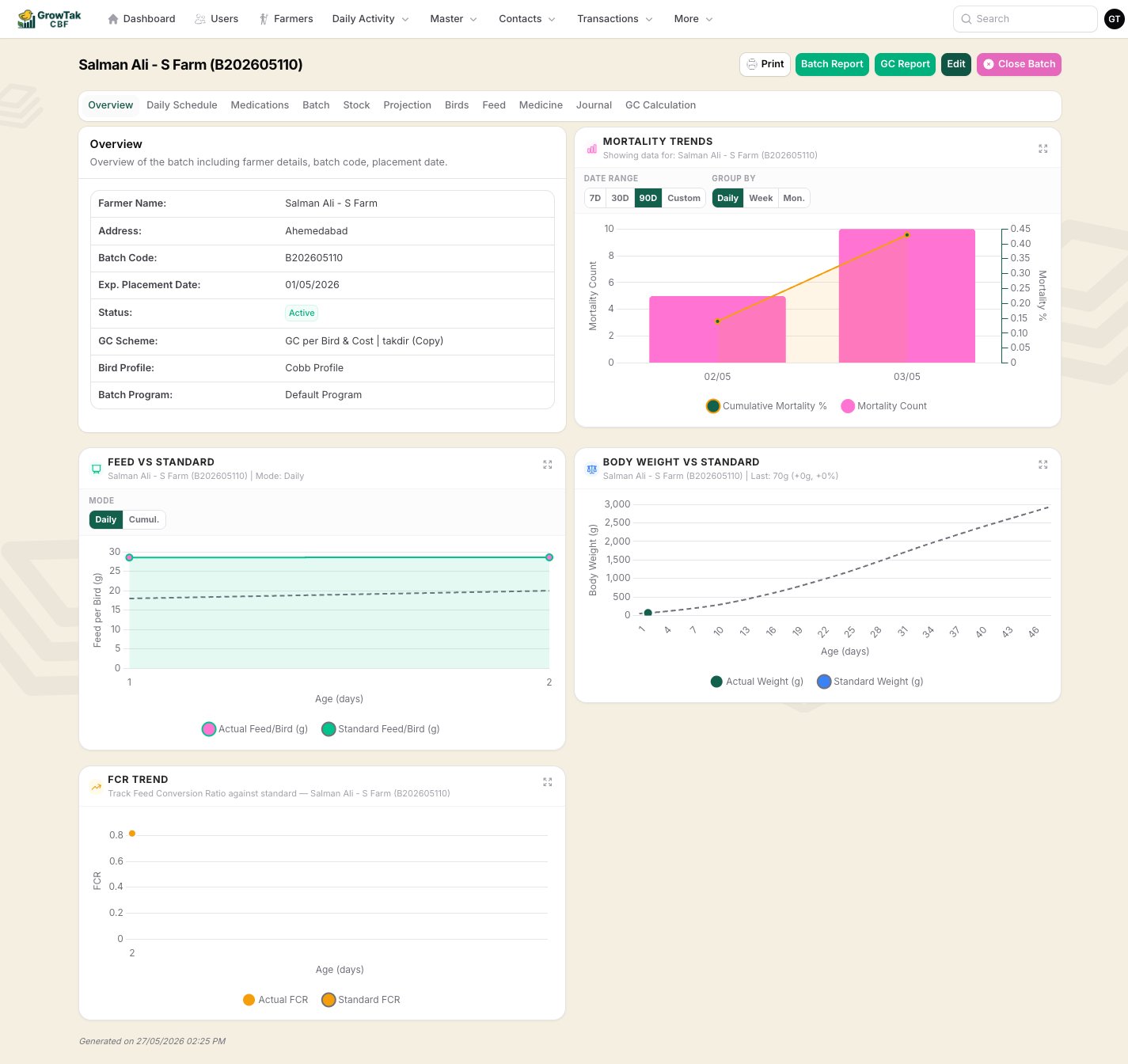
Opening a batch shows its **dashboard**: a header with actions, a row of tabs, and a default **Overview** of live performance. This is where you monitor a flock day to day.
 ## Header actions
| Action | What it does |
| ------------------------------ | ------------------------------------------------------------------------------ |
| **Print** | Prints the current view. |
| **Batch Report** | Opens the printable batch report. |
| **GC Report** | Opens the batch report focused on the GC figures. |
| **Edit** | Edits the batch's settings (profile, program, supervisors, etc.). |
| **Close Batch / Reopen Batch** | Ends or reopens the cycle. See [Closing a batch](/lifting-gc/closing-a-batch). |
## The tabs
Farmer & batch details (code, placement date, profile, program, GC scheme, status) plus the key charts: **Mortality Trends**, **Feed vs Standard**, **Body Weight vs Standard**, and **FCR Trend** — each comparing live data to the bird profile.
The batch program laid out against the flock's calendar, showing what feed/medicine is due on each day and what's been delivered.
Every medication/vaccination recorded for the batch, with products and quantities.
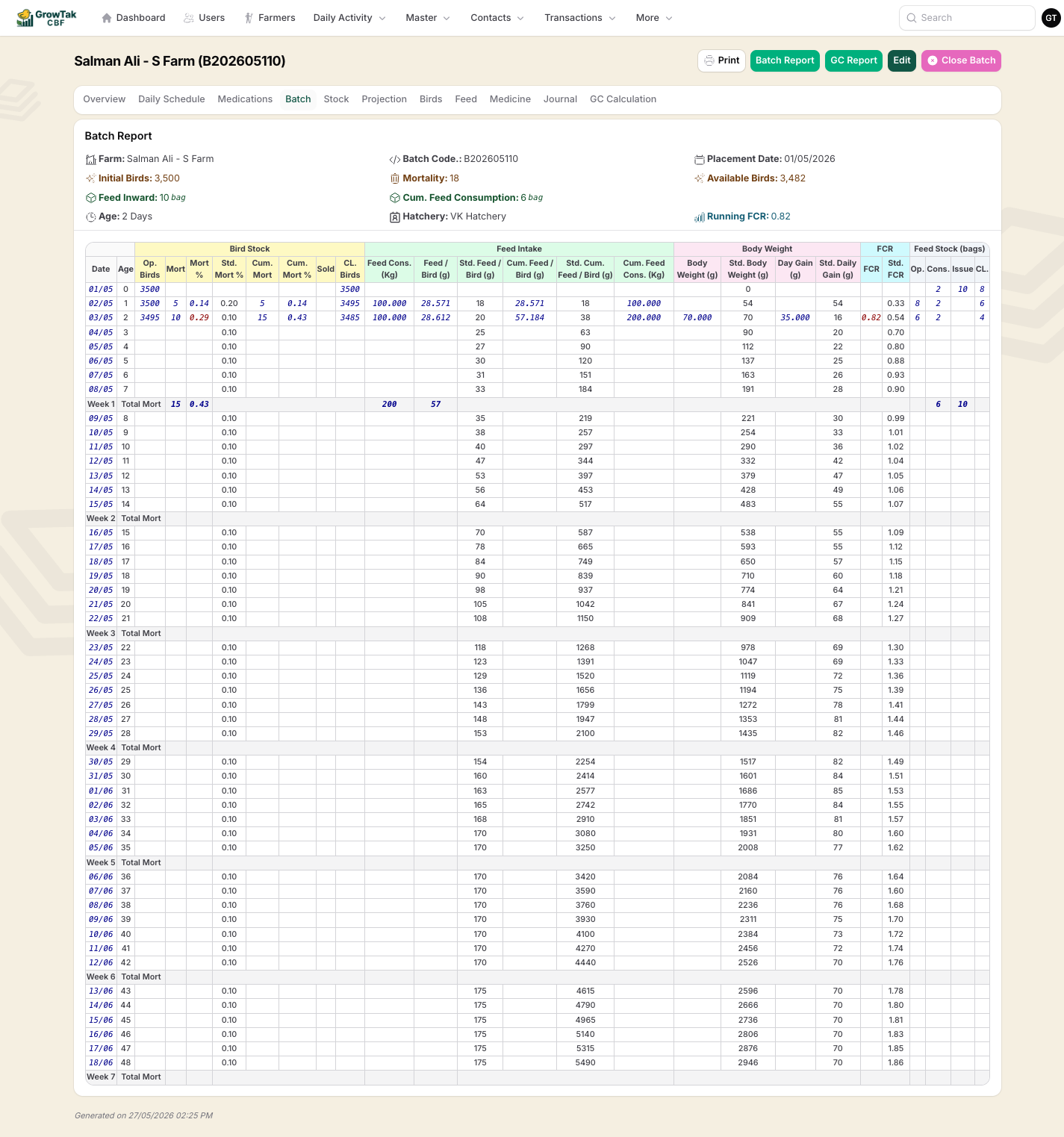
The detailed **day-by-day performance table** — bird stock, feed intake, body weight, FCR, and feed stock for every day, grouped by week, with actual figures alongside the standard.
## Header actions
| Action | What it does |
| ------------------------------ | ------------------------------------------------------------------------------ |
| **Print** | Prints the current view. |
| **Batch Report** | Opens the printable batch report. |
| **GC Report** | Opens the batch report focused on the GC figures. |
| **Edit** | Edits the batch's settings (profile, program, supervisors, etc.). |
| **Close Batch / Reopen Batch** | Ends or reopens the cycle. See [Closing a batch](/lifting-gc/closing-a-batch). |
## The tabs
Farmer & batch details (code, placement date, profile, program, GC scheme, status) plus the key charts: **Mortality Trends**, **Feed vs Standard**, **Body Weight vs Standard**, and **FCR Trend** — each comparing live data to the bird profile.
The batch program laid out against the flock's calendar, showing what feed/medicine is due on each day and what's been delivered.
Every medication/vaccination recorded for the batch, with products and quantities.
The detailed **day-by-day performance table** — bird stock, feed intake, body weight, FCR, and feed stock for every day, grouped by week, with actual figures alongside the standard.
 Current **feed and medicine stock** for the batch — purchased, consumed/transferred, and remaining, by product.
A **feed-demand forecast** using the batch program, lead time, and safety stock — so you can order feed before the farm runs out.
Three transaction logs — one each for bird, feed, and medicine movements on this batch.
A complete transaction journal for the batch. Visible only with the **Journal & GC** permission.
The Grower Contract worksheet — performance vs standard, cost breakdown, and the calculated payment. Visible only with the **Journal & GC** permission. See [GC calculation](/lifting-gc/gc-calculation).
## Editing entries from the dashboard
Within the transaction and day-entry logs on the batch, you can drill into and remove individual lines (a single day entry, a transaction line, or a medication line) without leaving the batch — handy for quick corrections.
The **Overview charts** are the quickest health check: if the actual line is tracking close to the dashed standard line on body weight and FCR, the flock is on plan.
Current **feed and medicine stock** for the batch — purchased, consumed/transferred, and remaining, by product.
A **feed-demand forecast** using the batch program, lead time, and safety stock — so you can order feed before the farm runs out.
Three transaction logs — one each for bird, feed, and medicine movements on this batch.
A complete transaction journal for the batch. Visible only with the **Journal & GC** permission.
The Grower Contract worksheet — performance vs standard, cost breakdown, and the calculated payment. Visible only with the **Journal & GC** permission. See [GC calculation](/lifting-gc/gc-calculation).
## Editing entries from the dashboard
Within the transaction and day-entry logs on the batch, you can drill into and remove individual lines (a single day entry, a transaction line, or a medication line) without leaving the batch — handy for quick corrections.
The **Overview charts** are the quickest health check: if the actual line is tracking close to the dashed standard line on body weight and FCR, the flock is on plan.