> ## Documentation Index
> Fetch the complete documentation index at: https://docs-cbf.growthtak.com/llms.txt
> Use this file to discover all available pages before exploring further.
# Feed projection & reorder alerts
> Forecast how much feed each batch still needs, see how many days of stock are left, and reorder before a farm runs out.
Feed is the biggest cost in a batch and the one thing a farm cannot run out of. The **Projection** tab on the batch dashboard forecasts feed demand day by day, tells you how many days of stock are left, and flags the batches you need to order for.
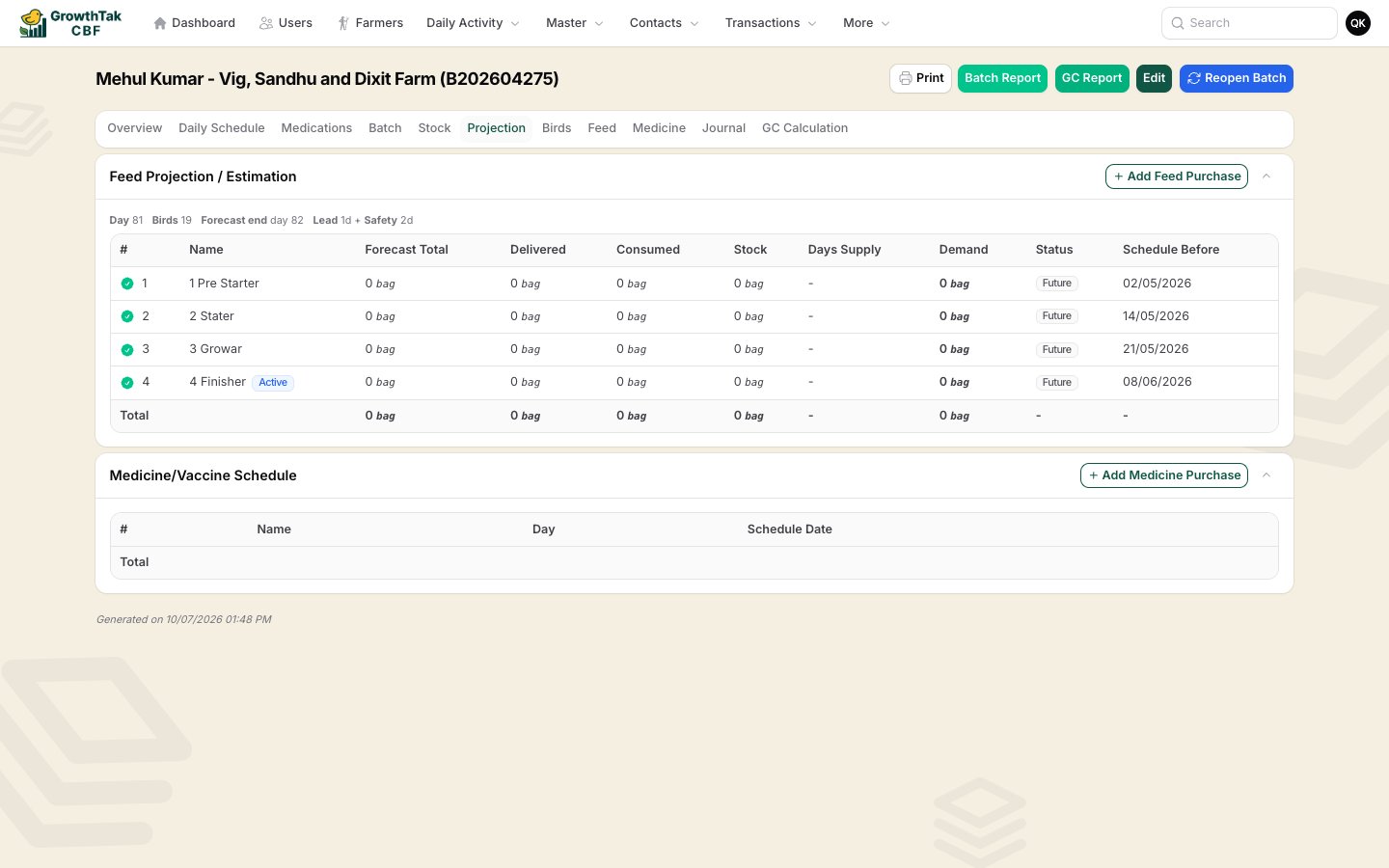 The batch in this screenshot has finished, so its rows read zero. On a running batch the figures are live and the **Status** column drives your ordering.
## What you need first
The forecast only runs when all three are in place:
The profile supplies the **standard daily feed per bird** and **standard mortality** for each day of age. See [Product profiles](/setup/product-profiles).
The program decides **which feed grade** applies on which day. See [Batch programs](/setup/batch-programs).
A completed Bird Purchase gives the placement date and the starting bird count.
If the batch has no profile, no program, or no birds placed yet, the Projection tab falls back to the plain per-bird plan — the **Days Supply** and **Status** columns show `-`.
## How the forecast is built
For every remaining day of the flock's life, GrowthTak CBF estimates one number — how much feed the birds will eat that day — and adds it up per feed grade.
The bird profile gives the **standard grams of feed per bird** for each day of age. This is the starting point for every day of the forecast.
Today's bird count is the real one — birds placed, minus birds sold, minus mortality recorded so far. From tomorrow onwards, GrowthTak CBF reduces the count each day using the **standard mortality** from the profile, so the forecast doesn't assume every bird survives to lifting.
The batch program decides which grade each day belongs to. Every future day is charged to exactly one feed grade, so Pre-Starter, Starter, Grower, and Finisher each get their own forecast. Past the last program day the batch keeps eating the last grade.
Real farms rarely eat exactly to the book. GrowthTak CBF compares the **last 5 day entries** for a grade against the standard for those same days and adjusts the forecast up or down by that ratio.
The adjustment is capped at **±15%**, and it only kicks in once there are at least **3** day entries for that grade — otherwise the plain standard is used. This keeps one mistyped day entry from wrecking the forecast.
Because calibration reads day entries, the forecast gets more accurate the more consistently your supervisors record daily feed consumption.
## Reading the table
One row per feed grade in the batch program.
| Column | Meaning |
| ------------------- | -------------------------------------------------------------------------------------------------------- |
| **Name** | The feed grade. An **Active** badge marks the grade the birds are on today. |
| **Forecast Total** | Everything this grade will consume across the whole batch — feed already eaten plus feed still to come. |
| **Delivered** | How much of this grade has reached the farm (purchases plus transfers in, minus transfers out). |
| **Consumed** | How much has actually been eaten, from day entries. |
| **Stock** | What's physically left at the farm right now. |
| **Days Supply** | How many days the current stock will last at the forecast rate. |
| **Demand** | How much more still needs to be delivered — forecast total minus delivered. This is your order quantity. |
| **Status** | The reorder signal. See below. |
| **Schedule Before** | The date this grade's phase ends. |
The strip above the table shows the batch's current **Day**, live **Birds** count, the **Forecast end** day, and the batch's **Lead** and **Safety** settings.
**Days Supply** is based on the next **7 days** of forecast demand, not a whole-batch average. That matters because a bird eats far more on day 30 than on day 5 — a week's worth of stock at today's rate would be gone in three days a fortnight later.
## Lead time and safety stock
Two settings on each batch turn the forecast into a reorder decision. Set them when you [create or edit the batch](/farmers-batches/creating-batches).
| Setting | What it means | Default |
| --------------------- | ---------------------------------------------------------------------------------------------------------------------------------- | ------- |
| **Feed lead time** | Days between placing an order and the feed actually arriving at this farm. A remote farm or a slow supplier needs a bigger number. | 1 day |
| **Feed safety stock** | Extra buffer days you want on hand on top of lead time, against delivery delays or the birds eating more than planned. | 2 days |
Neither setting changes *how much* feed is forecast — they decide **when you get warned**.
These are **per batch**, not company-wide. A farm three hours away should carry a longer lead time than one next door.
## Status meanings
| Status | When it shows | What to do |
| -------------- | ----------------------------------------------------- | ---------------------------------------------------------------------- |
| **Order Now** | Days supply is at or below the **lead time** | Order today — anything ordered now arrives after the farm has run dry. |
| **Order Soon** | Days supply is within **lead time + safety stock** | You're eating into the buffer. Raise the purchase. |
| **On Track** | Comfortably more stock than lead time + safety | Nothing to do. |
| **Future** | This grade's phase hasn't started yet | Nothing to do — it'll turn live as the flock ages. |
| **Done** | The phase is over and there's nothing left to procure | Nothing to do. |
| **-** | Not enough data to forecast | Check the batch has a profile, a program, and day entries. |
Worked example — lead time 1 day, safety stock 2 days. At **3 days** of supply or less you see *Order Soon*; at **1 day** or less it becomes *Order Now*.
## Ordering from the projection
Rows that still need feed show a **Buy** button next to the status. It opens a new [Feed Purchase](/transactions/feed) with the batch, the feed grade, the unit, and the demand quantity already filled in — you only add the supplier, rate, and date.
The **Add Feed Purchase** button in the section header does the same for the batch, without pre-filling a grade or quantity.
## The Feed Stock alert
You don't have to open each batch to find the ones at risk. The **Feed Stock** tab in the dashboard [Alert Center](/introduction/navigating) lists every batch-and-grade pair currently sitting at *Order Now* or *Order Soon*, across all your active batches.
* Rows are sorted **most urgent first** — Order Now before Order Soon, then fewest days of supply.
* Each row shows the farm, the batch, the feed grade, and the days of supply remaining.
* Selecting a row opens that batch straight on its Projection tab.
* Admins can narrow the list with the **supervisor filter**; supervisors see only their own assigned batches.
This tab computes live each time the dashboard loads, so it may take a moment longer to fill in than the other alert tabs. The figures are never stale.
Check the **Feed Stock** tab each morning alongside **Day Entries**. Between them you'll catch both the farms that stopped reporting and the farms about to run dry.
The batch in this screenshot has finished, so its rows read zero. On a running batch the figures are live and the **Status** column drives your ordering.
## What you need first
The forecast only runs when all three are in place:
The profile supplies the **standard daily feed per bird** and **standard mortality** for each day of age. See [Product profiles](/setup/product-profiles).
The program decides **which feed grade** applies on which day. See [Batch programs](/setup/batch-programs).
A completed Bird Purchase gives the placement date and the starting bird count.
If the batch has no profile, no program, or no birds placed yet, the Projection tab falls back to the plain per-bird plan — the **Days Supply** and **Status** columns show `-`.
## How the forecast is built
For every remaining day of the flock's life, GrowthTak CBF estimates one number — how much feed the birds will eat that day — and adds it up per feed grade.
The bird profile gives the **standard grams of feed per bird** for each day of age. This is the starting point for every day of the forecast.
Today's bird count is the real one — birds placed, minus birds sold, minus mortality recorded so far. From tomorrow onwards, GrowthTak CBF reduces the count each day using the **standard mortality** from the profile, so the forecast doesn't assume every bird survives to lifting.
The batch program decides which grade each day belongs to. Every future day is charged to exactly one feed grade, so Pre-Starter, Starter, Grower, and Finisher each get their own forecast. Past the last program day the batch keeps eating the last grade.
Real farms rarely eat exactly to the book. GrowthTak CBF compares the **last 5 day entries** for a grade against the standard for those same days and adjusts the forecast up or down by that ratio.
The adjustment is capped at **±15%**, and it only kicks in once there are at least **3** day entries for that grade — otherwise the plain standard is used. This keeps one mistyped day entry from wrecking the forecast.
Because calibration reads day entries, the forecast gets more accurate the more consistently your supervisors record daily feed consumption.
## Reading the table
One row per feed grade in the batch program.
| Column | Meaning |
| ------------------- | -------------------------------------------------------------------------------------------------------- |
| **Name** | The feed grade. An **Active** badge marks the grade the birds are on today. |
| **Forecast Total** | Everything this grade will consume across the whole batch — feed already eaten plus feed still to come. |
| **Delivered** | How much of this grade has reached the farm (purchases plus transfers in, minus transfers out). |
| **Consumed** | How much has actually been eaten, from day entries. |
| **Stock** | What's physically left at the farm right now. |
| **Days Supply** | How many days the current stock will last at the forecast rate. |
| **Demand** | How much more still needs to be delivered — forecast total minus delivered. This is your order quantity. |
| **Status** | The reorder signal. See below. |
| **Schedule Before** | The date this grade's phase ends. |
The strip above the table shows the batch's current **Day**, live **Birds** count, the **Forecast end** day, and the batch's **Lead** and **Safety** settings.
**Days Supply** is based on the next **7 days** of forecast demand, not a whole-batch average. That matters because a bird eats far more on day 30 than on day 5 — a week's worth of stock at today's rate would be gone in three days a fortnight later.
## Lead time and safety stock
Two settings on each batch turn the forecast into a reorder decision. Set them when you [create or edit the batch](/farmers-batches/creating-batches).
| Setting | What it means | Default |
| --------------------- | ---------------------------------------------------------------------------------------------------------------------------------- | ------- |
| **Feed lead time** | Days between placing an order and the feed actually arriving at this farm. A remote farm or a slow supplier needs a bigger number. | 1 day |
| **Feed safety stock** | Extra buffer days you want on hand on top of lead time, against delivery delays or the birds eating more than planned. | 2 days |
Neither setting changes *how much* feed is forecast — they decide **when you get warned**.
These are **per batch**, not company-wide. A farm three hours away should carry a longer lead time than one next door.
## Status meanings
| Status | When it shows | What to do |
| -------------- | ----------------------------------------------------- | ---------------------------------------------------------------------- |
| **Order Now** | Days supply is at or below the **lead time** | Order today — anything ordered now arrives after the farm has run dry. |
| **Order Soon** | Days supply is within **lead time + safety stock** | You're eating into the buffer. Raise the purchase. |
| **On Track** | Comfortably more stock than lead time + safety | Nothing to do. |
| **Future** | This grade's phase hasn't started yet | Nothing to do — it'll turn live as the flock ages. |
| **Done** | The phase is over and there's nothing left to procure | Nothing to do. |
| **-** | Not enough data to forecast | Check the batch has a profile, a program, and day entries. |
Worked example — lead time 1 day, safety stock 2 days. At **3 days** of supply or less you see *Order Soon*; at **1 day** or less it becomes *Order Now*.
## Ordering from the projection
Rows that still need feed show a **Buy** button next to the status. It opens a new [Feed Purchase](/transactions/feed) with the batch, the feed grade, the unit, and the demand quantity already filled in — you only add the supplier, rate, and date.
The **Add Feed Purchase** button in the section header does the same for the batch, without pre-filling a grade or quantity.
## The Feed Stock alert
You don't have to open each batch to find the ones at risk. The **Feed Stock** tab in the dashboard [Alert Center](/introduction/navigating) lists every batch-and-grade pair currently sitting at *Order Now* or *Order Soon*, across all your active batches.
* Rows are sorted **most urgent first** — Order Now before Order Soon, then fewest days of supply.
* Each row shows the farm, the batch, the feed grade, and the days of supply remaining.
* Selecting a row opens that batch straight on its Projection tab.
* Admins can narrow the list with the **supervisor filter**; supervisors see only their own assigned batches.
This tab computes live each time the dashboard loads, so it may take a moment longer to fill in than the other alert tabs. The figures are never stale.
Check the **Feed Stock** tab each morning alongside **Day Entries**. Between them you'll catch both the farms that stopped reporting and the farms about to run dry.