> ## Documentation Index
> Fetch the complete documentation index at: https://docs-cbf.growthtak.com/llms.txt
> Use this file to discover all available pages before exploring further.
# GC schemes
> Define how farmers are paid — fixed rules in Basic mode, or formula-driven components in Advanced mode.
Managing GC schemes is **admin only**. Find it under **Master → GC Schemes**.
A **GC (Grower Contract) scheme** is the rule set that decides how much a farmer is paid for a batch. You build a scheme once and attach it to batches; at the end of each batch GrowTak uses the scheme to [calculate the payment](/lifting-gc/gc-calculation).
Every scheme works in one of two **modes**:
Fill in fixed rates, an incentive/penalty rule, and tax. Simple, predictable, and enough for most contracts.
Build the payment from **formula-driven components** with optional conditions. Powerful for complex, tiered, or unusual contracts.
## Fields common to both modes
**Basic Information**
| Field | Notes |
| ----------- | ------------------------------------------------------- |
| **Name** | e.g. *Standard Broiler 2026*. |
| **Status** | *Active* schemes can be attached to batches. |
| **GC Mode** | *Basic* or *Advanced* — switches which sections appear. |
| **Remark** | Optional. |
**Cost Details** — the company's growing costs, used to work out production cost per kg:
| Field | Meaning |
| -------------------------------- | ------------------------------------------------------------------------------ |
| **Chick Cost / Chick Placed** | Cost of each chick. |
| **Feed Cost / Kg feed consumed** | Cost per kg of feed. |
| **Admin Cost Type** | The basis for admin/overhead — *Chick Placed*, *Bird Sold*, or *Kg Bird Sold*. |
| **Admin Cost** | The scheme's admin rate on that basis. |
| **Admin Cost Actual** | The actual admin rate to use in the real calculation. |
## Basic mode
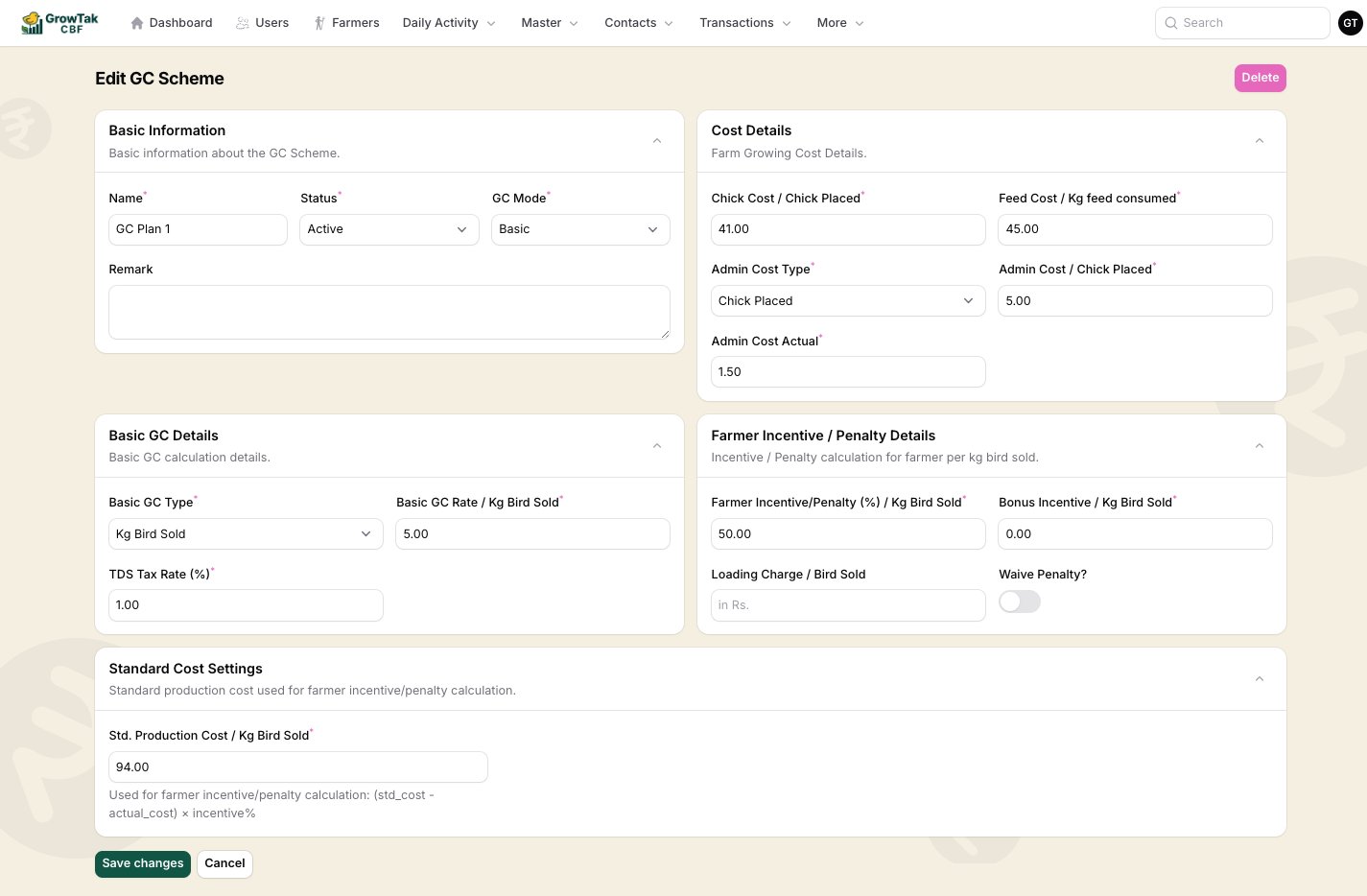 **Basic GC Details**
| Field | Meaning |
| -------------------- | ---------------------------------------------------------------------------------- |
| **Basic GC Type** | What the base rate is charged on — *Kg Bird Sold*, *Bird Sold*, or *Chick Placed*. |
| **Basic GC Rate** | The base payment per that unit. |
| **TDS Tax Rate (%)** | Tax withheld from the GC. |
**Farmer Incentive / Penalty Details**
| Field | Meaning |
| ---------------------------------- | ------------------------------------------------------------------------------------------ |
| **Farmer Incentive/Penalty (%)** | The share of cost saving (or overrun) passed to the farmer, per kg sold. |
| **Bonus Incentive / Kg Bird Sold** | A flat bonus per kg. |
| **Loading Charge / Bird Sold** | A per-bird charge added (e.g. catching/loading). |
| **Waive Penalty?** | If on, a negative incentive is set to zero — the farmer is never penalised below the base. |
**Standard Cost Settings**
| Field | Meaning |
| --------------------------------------- | --------------------------------------------------------------------------------------------- |
| **Std. Production Cost / Kg Bird Sold** | The benchmark cost per kg. The incentive/penalty is `(std cost − actual cost) × incentive %`. |
### How Basic mode is calculated
In plain terms, the basic GC adds up like this:
`Basic GC Rate × quantity` (where quantity is kg sold, birds sold, or chicks placed — per the **Basic GC Type**).
`(Std. Production Cost − Actual cost per kg) × Farmer Incentive % × kg sold`. Beat the benchmark → a positive incentive; exceed it → a penalty (unless **Waive Penalty** is on).
Add `Bonus Incentive × kg sold`, if any.
Subtract **TDS** at the configured rate.
Add `Loading Charge × birds sold`, if any.
The result is the **total GC payable**, and **GC per bird** is that divided by birds sold.
## Advanced mode
Advanced mode replaces the fixed Basic/Incentive sections with two things: **Variance Settings** and a list of **Dynamic GC Components**.
**Basic GC Details**
| Field | Meaning |
| -------------------- | ---------------------------------------------------------------------------------- |
| **Basic GC Type** | What the base rate is charged on — *Kg Bird Sold*, *Bird Sold*, or *Chick Placed*. |
| **Basic GC Rate** | The base payment per that unit. |
| **TDS Tax Rate (%)** | Tax withheld from the GC. |
**Farmer Incentive / Penalty Details**
| Field | Meaning |
| ---------------------------------- | ------------------------------------------------------------------------------------------ |
| **Farmer Incentive/Penalty (%)** | The share of cost saving (or overrun) passed to the farmer, per kg sold. |
| **Bonus Incentive / Kg Bird Sold** | A flat bonus per kg. |
| **Loading Charge / Bird Sold** | A per-bird charge added (e.g. catching/loading). |
| **Waive Penalty?** | If on, a negative incentive is set to zero — the farmer is never penalised below the base. |
**Standard Cost Settings**
| Field | Meaning |
| --------------------------------------- | --------------------------------------------------------------------------------------------- |
| **Std. Production Cost / Kg Bird Sold** | The benchmark cost per kg. The incentive/penalty is `(std cost − actual cost) × incentive %`. |
### How Basic mode is calculated
In plain terms, the basic GC adds up like this:
`Basic GC Rate × quantity` (where quantity is kg sold, birds sold, or chicks placed — per the **Basic GC Type**).
`(Std. Production Cost − Actual cost per kg) × Farmer Incentive % × kg sold`. Beat the benchmark → a positive incentive; exceed it → a penalty (unless **Waive Penalty** is on).
Add `Bonus Incentive × kg sold`, if any.
Subtract **TDS** at the configured rate.
Add `Loading Charge × birds sold`, if any.
The result is the **total GC payable**, and **GC per bird** is that divided by birds sold.
## Advanced mode
Advanced mode replaces the fixed Basic/Incentive sections with two things: **Variance Settings** and a list of **Dynamic GC Components**.
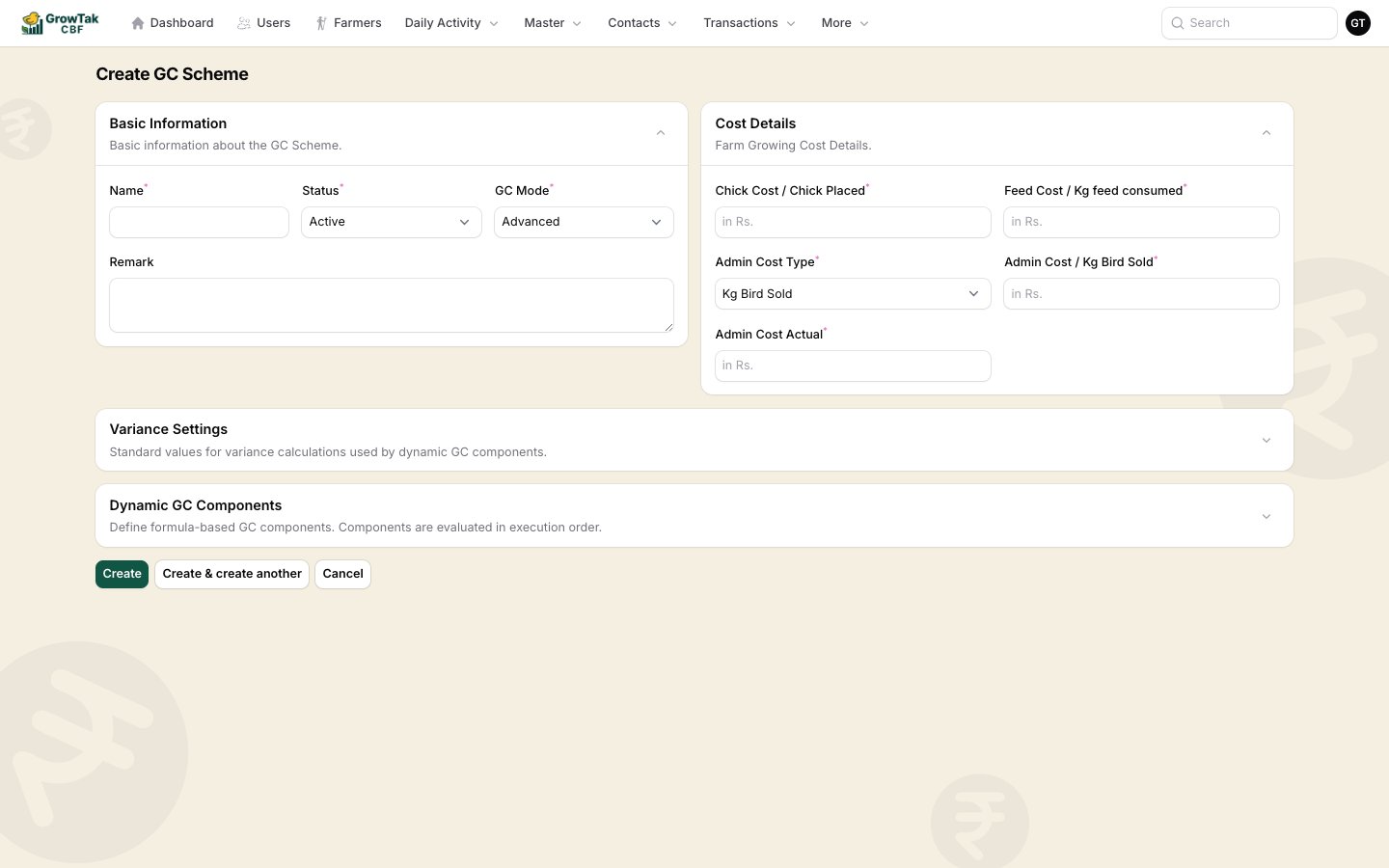 **Variance Settings** — the standards that variance variables compare against:
| Field | Meaning |
| ---------------------- | ---------------------------------------------------- |
| **Standard FCR** | Benchmark FCR, used by `fcr_variance`. |
| **Standard Mortality** | Benchmark mortality %, used by `mortality_variance`. |
**Dynamic GC Components** — the payment is built from a list of components, each evaluated **in order**:
| Property | Meaning |
| ------------------- | ------------------------------------------------------------------------------------------------------------------------ |
| **Name** | A label, e.g. *Base Rate*, *FCR Incentive*. |
| **Type** | *Base Rate*, *Incentive*, *Penalty*, *Adjustment*, or *Deduction*. **Penalty** and **Deduction** subtract; the rest add. |
| **Execution stage** | *Main* (normal) or *Post* (runs after the mains — e.g. a tax on the running total). |
| **Active** | Toggle a component on/off. |
| **Formula** | An expression that produces the component's amount (see below). |
| **Condition** | An optional rule — the component only applies when the condition is true. |
### Formulas
A component's **formula** is a math expression written with the variables GrowTak provides for the batch. For example:
```text theme={null}
sales_rate * total_sold_weight // base payment on weight sold
fcr_variance * 2 * total_sold_weight // ₹2/kg for every point FCR beats standard
total_gc_without_tax * 0.01 // 1% deduction (as a Post component)
```
### Conditions
A **condition** decides whether a component applies. It can be a single rule or a group of rules joined by **AND/OR**. Each rule compares a variable to a value with an operator (`<`, `<=`, `==`, `>=`, `>`, or `between`). For example: *apply this penalty only when `mortality_percentage > 5`*.
### Available variables
These are the values you can use in formulas and conditions. They're computed from the batch's actual data at calculation time.
| Variable | Meaning |
| ----------------------- | -------------------------- |
| `total_birds_in` | Chicks placed |
| `total_mortality` | Birds died/removed |
| `mortality_percentage` | Mortality as % of placed |
| `livability_percentage` | 100 − mortality % |
| `total_bird_sold` | Birds sold |
| `remaining_birds` | Placed − mortality − sold |
| `mean_age` | Average age at sale (days) |
| Variable | Meaning |
| ------------------- | --------------------------------- |
| `fcr` | Actual feed conversion ratio |
| `avg_bird_weight` | Average weight per bird sold (kg) |
| `total_sold_weight` | Total kg of birds sold |
| Variable | Meaning |
| ------------------------ | ----------------------- |
| `feed_cost_actual` | Actual feed cost |
| `medication_cost_actual` | Actual medicine cost |
| `chick_cost_actual` | Actual chick cost |
| `total_cost_actual` | Sum of actual costs |
| `total_cost_scheme` | Cost using scheme rates |
| `cost_per_kg_actual` | Actual cost ÷ kg sold |
| `cost_per_kg_scheme` | Scheme cost ÷ kg sold |
| Variable | Meaning |
| ----------------------------- | ---------------------------------------------------- |
| `fcr_variance` | Standard FCR − actual FCR (positive = better) |
| `mortality_variance` | Standard mortality % − actual (positive = better) |
| `production_cost_kg_variance` | Std production cost − scheme cost per kg |
| `sales_rate` | Average sale rate per kg |
| `running_total` | GC accumulated so far (updates after each component) |
The scheme form shows this same variable list inline as a helper while you write formulas, so you don't have to memorise the names.
## Templates, cloning & reuse
* Mark a scheme as a **template** to reuse it as a starting point.
* **Clone** any scheme (with its components) to make a variant.
* Use **Create from template** to spin up a new scheme from a saved template.
A scheme that's already attached to a batch **cannot be deleted**. Set it *Inactive* or clone it to make changes for future batches.
**Variance Settings** — the standards that variance variables compare against:
| Field | Meaning |
| ---------------------- | ---------------------------------------------------- |
| **Standard FCR** | Benchmark FCR, used by `fcr_variance`. |
| **Standard Mortality** | Benchmark mortality %, used by `mortality_variance`. |
**Dynamic GC Components** — the payment is built from a list of components, each evaluated **in order**:
| Property | Meaning |
| ------------------- | ------------------------------------------------------------------------------------------------------------------------ |
| **Name** | A label, e.g. *Base Rate*, *FCR Incentive*. |
| **Type** | *Base Rate*, *Incentive*, *Penalty*, *Adjustment*, or *Deduction*. **Penalty** and **Deduction** subtract; the rest add. |
| **Execution stage** | *Main* (normal) or *Post* (runs after the mains — e.g. a tax on the running total). |
| **Active** | Toggle a component on/off. |
| **Formula** | An expression that produces the component's amount (see below). |
| **Condition** | An optional rule — the component only applies when the condition is true. |
### Formulas
A component's **formula** is a math expression written with the variables GrowTak provides for the batch. For example:
```text theme={null}
sales_rate * total_sold_weight // base payment on weight sold
fcr_variance * 2 * total_sold_weight // ₹2/kg for every point FCR beats standard
total_gc_without_tax * 0.01 // 1% deduction (as a Post component)
```
### Conditions
A **condition** decides whether a component applies. It can be a single rule or a group of rules joined by **AND/OR**. Each rule compares a variable to a value with an operator (`<`, `<=`, `==`, `>=`, `>`, or `between`). For example: *apply this penalty only when `mortality_percentage > 5`*.
### Available variables
These are the values you can use in formulas and conditions. They're computed from the batch's actual data at calculation time.
| Variable | Meaning |
| ----------------------- | -------------------------- |
| `total_birds_in` | Chicks placed |
| `total_mortality` | Birds died/removed |
| `mortality_percentage` | Mortality as % of placed |
| `livability_percentage` | 100 − mortality % |
| `total_bird_sold` | Birds sold |
| `remaining_birds` | Placed − mortality − sold |
| `mean_age` | Average age at sale (days) |
| Variable | Meaning |
| ------------------- | --------------------------------- |
| `fcr` | Actual feed conversion ratio |
| `avg_bird_weight` | Average weight per bird sold (kg) |
| `total_sold_weight` | Total kg of birds sold |
| Variable | Meaning |
| ------------------------ | ----------------------- |
| `feed_cost_actual` | Actual feed cost |
| `medication_cost_actual` | Actual medicine cost |
| `chick_cost_actual` | Actual chick cost |
| `total_cost_actual` | Sum of actual costs |
| `total_cost_scheme` | Cost using scheme rates |
| `cost_per_kg_actual` | Actual cost ÷ kg sold |
| `cost_per_kg_scheme` | Scheme cost ÷ kg sold |
| Variable | Meaning |
| ----------------------------- | ---------------------------------------------------- |
| `fcr_variance` | Standard FCR − actual FCR (positive = better) |
| `mortality_variance` | Standard mortality % − actual (positive = better) |
| `production_cost_kg_variance` | Std production cost − scheme cost per kg |
| `sales_rate` | Average sale rate per kg |
| `running_total` | GC accumulated so far (updates after each component) |
The scheme form shows this same variable list inline as a helper while you write formulas, so you don't have to memorise the names.
## Templates, cloning & reuse
* Mark a scheme as a **template** to reuse it as a starting point.
* **Clone** any scheme (with its components) to make a variant.
* Use **Create from template** to spin up a new scheme from a saved template.
A scheme that's already attached to a batch **cannot be deleted**. Set it *Inactive* or clone it to make changes for future batches.