> ## Documentation Index
> Fetch the complete documentation index at: https://docs-cbf.growthtak.com/llms.txt
> Use this file to discover all available pages before exploring further.
# Batch programs (feed & vaccine schedule)
> Build a reusable day-wise feed and medicine schedule for your flocks.
Managing batch programs is **admin only**. Find it under **Master → Batch Programs**.
A **batch program** is a reusable plan of **which feed and medicine to give on which day** of the flock's life. Once a batch is linked to a program, GrowTak uses it to:
* **Project feed demand** ahead of time (so you can order feed before it runs out).
* **Auto-detect the feed type** when a supervisor records a [day entry](/daily-entry/recording-a-day-entry).
* Drive the **vaccine due** alerts and report.
Your company starts with a *Default Program*; edit it or create your own.
## Building a program
Open a program (or select **New batch program**).
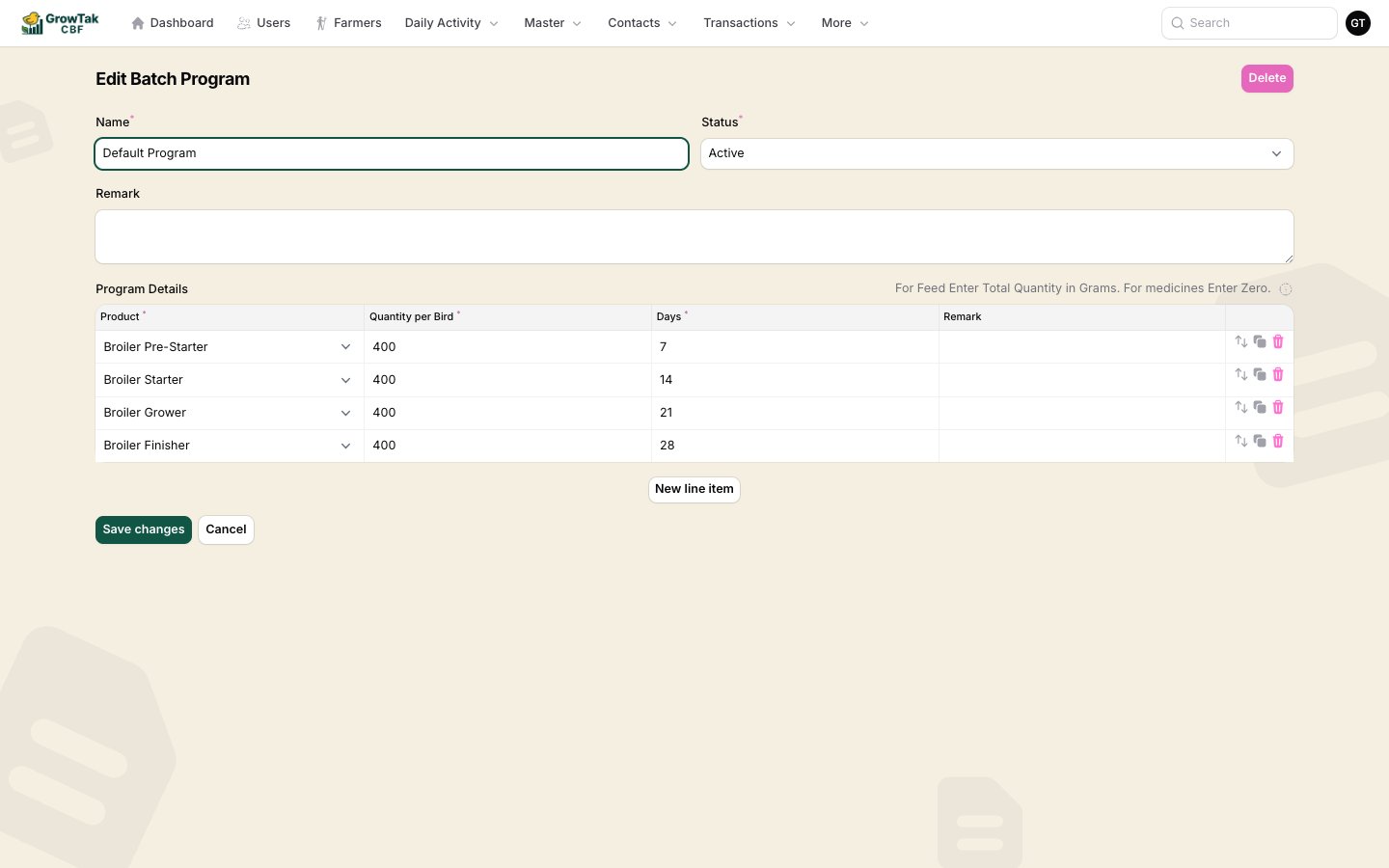 Top fields:
| Field | Notes |
| ---------- | ----------------------------------------------- |
| **Name** | e.g. *Standard 42-day Broiler*. |
| **Status** | *Active* programs can be chosen on new batches. |
| **Remark** | Optional notes. |
**Program details** — one row per scheduled item:
| Column | Meaning |
| --------------------- | --------------------------------------------------------------------------------------- |
| **Product** | The feed grade or medicine/vaccine. |
| **Quantity per Bird** | For **feed**, the total quantity per bird in **grams**. For **medicines**, enter **0**. |
| **Days** | The day of life this item starts/applies. |
| **Remark** | Optional. |
The on-screen hint says it clearly: *"For Feed enter total quantity in grams. For medicines enter zero."* Feed rows drive feed projection; medicine/vaccine rows drive the vaccination schedule and alerts.
Use the **clone** and **reorder** controls to assemble the schedule quickly, then save.
## How the program is used on a batch
When you create a batch you pick one program. After that:
* The batch's **Projection** tab forecasts feed demand using the program plus the batch's *feed lead time* and *safety stock* days.
* On each day entry, the **Feed Type** is pre-selected based on the program and the batch's current age — the supervisor only changes it if a different feed was actually used.
* The batch's **Daily Schedule** tab shows the program laid out against the flock's calendar.
A program that's already used by a batch **cannot be deleted**. Set it to *Inactive* instead.
Top fields:
| Field | Notes |
| ---------- | ----------------------------------------------- |
| **Name** | e.g. *Standard 42-day Broiler*. |
| **Status** | *Active* programs can be chosen on new batches. |
| **Remark** | Optional notes. |
**Program details** — one row per scheduled item:
| Column | Meaning |
| --------------------- | --------------------------------------------------------------------------------------- |
| **Product** | The feed grade or medicine/vaccine. |
| **Quantity per Bird** | For **feed**, the total quantity per bird in **grams**. For **medicines**, enter **0**. |
| **Days** | The day of life this item starts/applies. |
| **Remark** | Optional. |
The on-screen hint says it clearly: *"For Feed enter total quantity in grams. For medicines enter zero."* Feed rows drive feed projection; medicine/vaccine rows drive the vaccination schedule and alerts.
Use the **clone** and **reorder** controls to assemble the schedule quickly, then save.
## How the program is used on a batch
When you create a batch you pick one program. After that:
* The batch's **Projection** tab forecasts feed demand using the program plus the batch's *feed lead time* and *safety stock* days.
* On each day entry, the **Feed Type** is pre-selected based on the program and the batch's current age — the supervisor only changes it if a different feed was actually used.
* The batch's **Daily Schedule** tab shows the program laid out against the flock's calendar.
A program that's already used by a batch **cannot be deleted**. Set it to *Inactive* instead.