> ## Documentation Index
> Fetch the complete documentation index at: https://docs-cbf.growthtak.com/llms.txt
> Use this file to discover all available pages before exploring further.
# Company settings
> Configure your company profile, transaction labels, GPS rules, modules, and other behaviour.
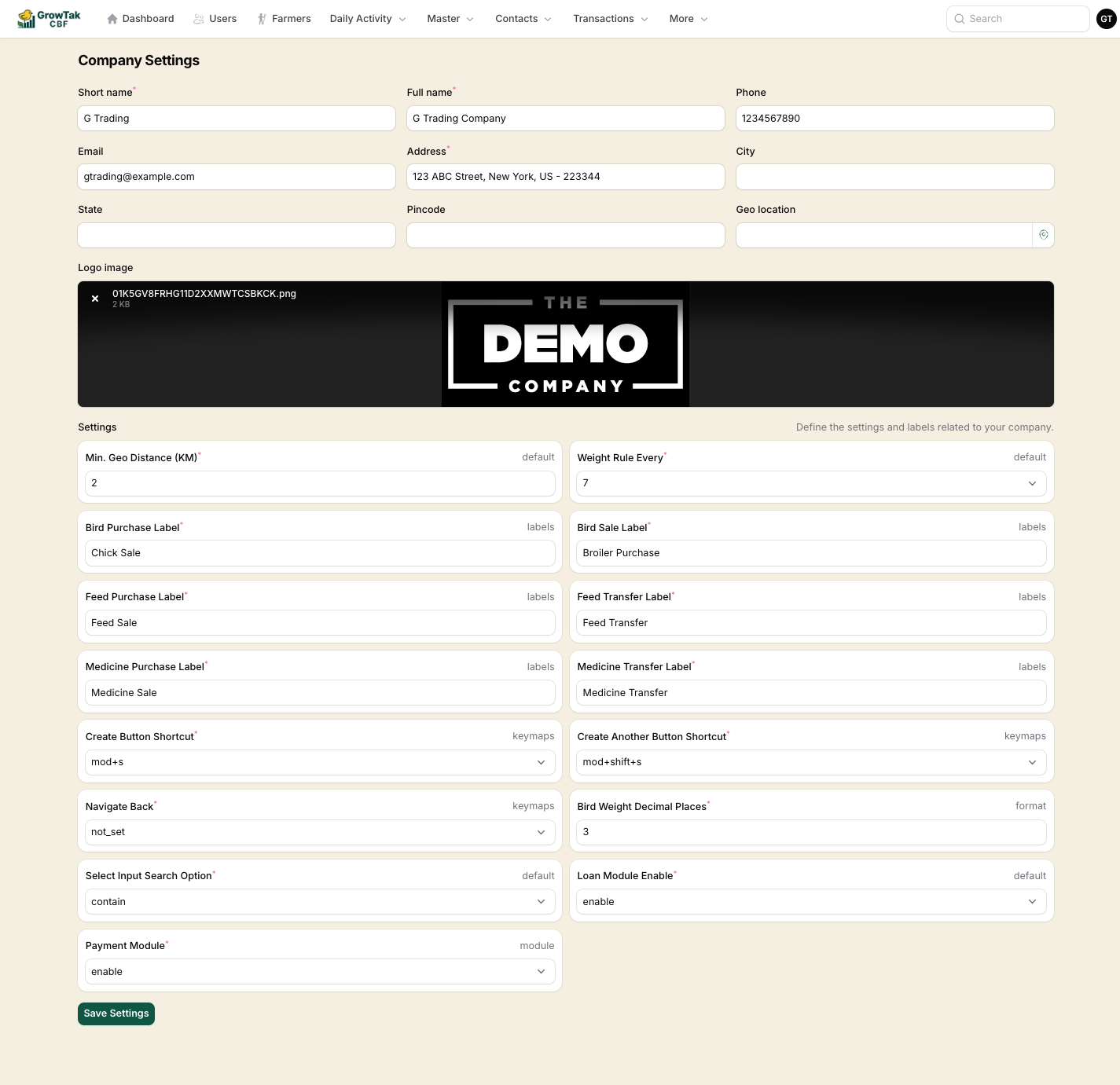
Company Settings is **admin only**. Open it from the **user menu** (your initials, top-right) → **Company Settings**.
This screen controls your company profile and the behaviour of GrowTak across the whole company.
 ## Company profile
| Field | Notes |
| -------------------------------- | ---------------------------------------------------------------------------------------------------------------------------------- |
| **Short name** | Required. A brief name used in compact places. |
| **Full name** | Required. Appears on report headers and receipts. |
| **Phone**, **Email** | Contact details. |
| **Address** | Required. |
| **City**, **State**, **Pincode** | Address breakdown. |
| **Geo location** | Your company's latitude/longitude. Set this to enable the **weather** widget on the dashboard. Use the location button to pick it. |
| **Logo image** | Upload your logo (image, up to \~1 MB). It appears in the top bar and on printed reports. |
## Behaviour settings
The lower **Settings** panel is grouped by tags shown on the right of each field (*default*, *labels*, *keymaps*, *format*, *module*).
### General (default)
| Setting | Default | What it does |
| ----------------------------------------- | ------- | ----------------------------------------------------------------------------------------------------------------------------------------------- |
| **Min. Geo Distance (KM)** | 2 | If a day entry is captured further than this from the farmer's saved location, it's flagged **Away** instead of **In place**. |
| **Weight Rule Every** | 7 | How often a body-weight reading is expected (every 1, 7, or 10 days). Drives the weight reminder and the "weight required" rule in day entries. |
| **Select Input Search Option** | contain | How dropdown search matches text — anywhere in the word (*contain*) or only at the start (*start with*). |
| **Auto-Close Batch After GC Save (days)** | off | Optionally auto-close a batch a set number of days after its GC is saved. |
### Transaction labels (labels)
Rename the six transaction types to match the words your team uses. The default names are **Bird Purchase**, **Bird Sale**, **Feed Purchase**, **Feed Transfer**, **Medicine Purchase**, and **Medicine Transfer**.
Renaming only changes the **label** shown in menus and screens — it does not change what the transaction does. This guide always uses the default names. (For example, the demo company in our screenshots renamed *Bird Purchase* to *Chick Sale*, so don't be surprised if your labels differ.)
### GPS (GPS)
| Setting | Default | What it does |
| ------------------------------ | -------- | ------------------------------------------------------------------------------------------------------------------------------------------- |
| **GPS Capture Mode** | disabled | `disabled`, `optional`, or `required` — whether day entries capture the supervisor's location. See [GPS tagging](/daily-entry/gps-tagging). |
| **GPS Accuracy Threshold (m)** | 500 | Warn when the captured location's accuracy is poorer than this. |
### Keyboard shortcuts (keymaps)
Set the shortcuts for **Create**, **Create another**, and **Navigate back** to speed up data entry on desktop.
### Formatting (format)
| Setting | Default | What it does |
| ------------------------------ | ------- | ------------------------------------------- |
| **Bird Weight Decimal Places** | 3 | How many decimals to keep for bird weights. |
### Optional modules (module)
| Setting | Default | What it does |
| ------------------ | -------------- | ------------------------------------------------------------------------------- |
| **Loan Module** | disable | Enables farmer **loans** and repayment tracking, and the Loan report. |
| **Payment Module** | enable/disable | Enables the **Payments** screen, receipts, and the payment/outstanding reports. |
Turn the **Loan** and **Payment** modules on only if you actually advance money to farmers or want to record payments inside GrowTak. When off, those menus and reports are hidden to keep the interface simple.
Select **Save Settings** to apply. Changes take effect immediately across the company.
## Company profile
| Field | Notes |
| -------------------------------- | ---------------------------------------------------------------------------------------------------------------------------------- |
| **Short name** | Required. A brief name used in compact places. |
| **Full name** | Required. Appears on report headers and receipts. |
| **Phone**, **Email** | Contact details. |
| **Address** | Required. |
| **City**, **State**, **Pincode** | Address breakdown. |
| **Geo location** | Your company's latitude/longitude. Set this to enable the **weather** widget on the dashboard. Use the location button to pick it. |
| **Logo image** | Upload your logo (image, up to \~1 MB). It appears in the top bar and on printed reports. |
## Behaviour settings
The lower **Settings** panel is grouped by tags shown on the right of each field (*default*, *labels*, *keymaps*, *format*, *module*).
### General (default)
| Setting | Default | What it does |
| ----------------------------------------- | ------- | ----------------------------------------------------------------------------------------------------------------------------------------------- |
| **Min. Geo Distance (KM)** | 2 | If a day entry is captured further than this from the farmer's saved location, it's flagged **Away** instead of **In place**. |
| **Weight Rule Every** | 7 | How often a body-weight reading is expected (every 1, 7, or 10 days). Drives the weight reminder and the "weight required" rule in day entries. |
| **Select Input Search Option** | contain | How dropdown search matches text — anywhere in the word (*contain*) or only at the start (*start with*). |
| **Auto-Close Batch After GC Save (days)** | off | Optionally auto-close a batch a set number of days after its GC is saved. |
### Transaction labels (labels)
Rename the six transaction types to match the words your team uses. The default names are **Bird Purchase**, **Bird Sale**, **Feed Purchase**, **Feed Transfer**, **Medicine Purchase**, and **Medicine Transfer**.
Renaming only changes the **label** shown in menus and screens — it does not change what the transaction does. This guide always uses the default names. (For example, the demo company in our screenshots renamed *Bird Purchase* to *Chick Sale*, so don't be surprised if your labels differ.)
### GPS (GPS)
| Setting | Default | What it does |
| ------------------------------ | -------- | ------------------------------------------------------------------------------------------------------------------------------------------- |
| **GPS Capture Mode** | disabled | `disabled`, `optional`, or `required` — whether day entries capture the supervisor's location. See [GPS tagging](/daily-entry/gps-tagging). |
| **GPS Accuracy Threshold (m)** | 500 | Warn when the captured location's accuracy is poorer than this. |
### Keyboard shortcuts (keymaps)
Set the shortcuts for **Create**, **Create another**, and **Navigate back** to speed up data entry on desktop.
### Formatting (format)
| Setting | Default | What it does |
| ------------------------------ | ------- | ------------------------------------------- |
| **Bird Weight Decimal Places** | 3 | How many decimals to keep for bird weights. |
### Optional modules (module)
| Setting | Default | What it does |
| ------------------ | -------------- | ------------------------------------------------------------------------------- |
| **Loan Module** | disable | Enables farmer **loans** and repayment tracking, and the Loan report. |
| **Payment Module** | enable/disable | Enables the **Payments** screen, receipts, and the payment/outstanding reports. |
Turn the **Loan** and **Payment** modules on only if you actually advance money to farmers or want to record payments inside GrowTak. When off, those menus and reports are hidden to keep the interface simple.
Select **Save Settings** to apply. Changes take effect immediately across the company.