> ## Documentation Index
> Fetch the complete documentation index at: https://docs-cbf.growthtak.com/llms.txt
> Use this file to discover all available pages before exploring further.
# Bird profiles (standard growth curve)
> Set the day-by-day breed standard that GrowTak compares every batch against.
Managing bird profiles is **admin only**. Find it under **Master → Product Profiles**.
A **bird profile** (Product Profile) is the **breed standard** — what a healthy flock *should* achieve at each day of age. GrowTak compares every batch's live numbers against this curve in charts and reports, so you can instantly see whether a flock is ahead of or behind standard.
Your company comes with a starter profile (e.g. a Cobb profile with entries for days 1–49). You can edit it or add profiles for other breeds.
## What a profile contains
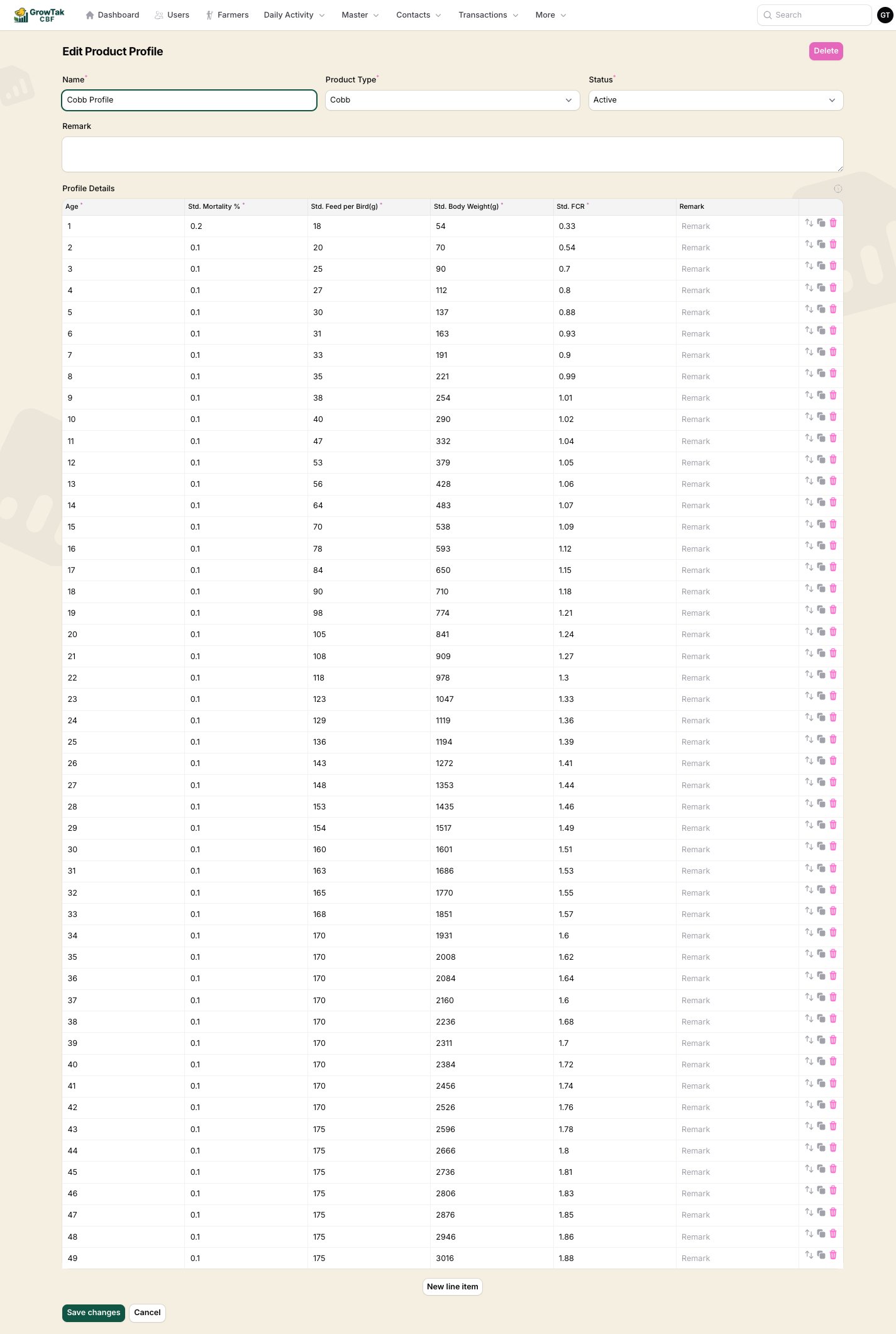 Top fields:
| Field | Notes |
| ---------------- | ----------------------------------------------------------------- |
| **Name** | e.g. *Cobb Profile*. This is what you pick when creating a batch. |
| **Product type** | The bird type the profile belongs to. |
| **Status** | *Active* profiles are selectable on new batches. |
| **Remark** | Optional notes. |
**Profile details** — one row per day of age:
| Column | Meaning |
| -------------------------- | ------------------------------------------ |
| **Age** | Day of life (1, 2, 3, …). |
| **Std. Mortality %** | Expected cumulative mortality at that age. |
| **Std. Feed per Bird (g)** | Expected feed consumed per bird. |
| **Std. Body Weight (g)** | Expected average live weight. |
| **Std. FCR** | Expected feed conversion ratio. |
| **Remark** | Optional. |
## Editing the curve
* Add or remove rows to match the length of your growing cycle.
* Use the **clone** and **reorder** controls on each row to build the table quickly.
* Enter realistic, breed-specific figures — every "vs standard" chart and the **FCR variance** used in advanced GC schemes depends on these numbers.
A profile that's already used by a batch **cannot be deleted**. Set it to *Inactive* instead.
Get the standard body weight and FCR right first — these are the values supervisors and reports check against most often. You can refine mortality and feed figures later.
Top fields:
| Field | Notes |
| ---------------- | ----------------------------------------------------------------- |
| **Name** | e.g. *Cobb Profile*. This is what you pick when creating a batch. |
| **Product type** | The bird type the profile belongs to. |
| **Status** | *Active* profiles are selectable on new batches. |
| **Remark** | Optional notes. |
**Profile details** — one row per day of age:
| Column | Meaning |
| -------------------------- | ------------------------------------------ |
| **Age** | Day of life (1, 2, 3, …). |
| **Std. Mortality %** | Expected cumulative mortality at that age. |
| **Std. Feed per Bird (g)** | Expected feed consumed per bird. |
| **Std. Body Weight (g)** | Expected average live weight. |
| **Std. FCR** | Expected feed conversion ratio. |
| **Remark** | Optional. |
## Editing the curve
* Add or remove rows to match the length of your growing cycle.
* Use the **clone** and **reorder** controls on each row to build the table quickly.
* Enter realistic, breed-specific figures — every "vs standard" chart and the **FCR variance** used in advanced GC schemes depends on these numbers.
A profile that's already used by a batch **cannot be deleted**. Set it to *Inactive* instead.
Get the standard body weight and FCR right first — these are the values supervisors and reports check against most often. You can refine mortality and feed figures later.