> ## Documentation Index
> Fetch the complete documentation index at: https://docs-cbf.growthtak.com/llms.txt
> Use this file to discover all available pages before exploring further.
# Feed transactions
> Buy feed into a batch and move feed between batches.
Feed reaches a batch in two ways: a **Feed Purchase** (bought from a supplier) or a **Feed Transfer** (moved from another batch or your godown). Both add to the receiving batch's feed stock, which is then drawn down by daily [feed consumption](/daily-entry/recording-a-day-entry).
## Feed Purchase
Records feed bought from a supplier and delivered to a batch.
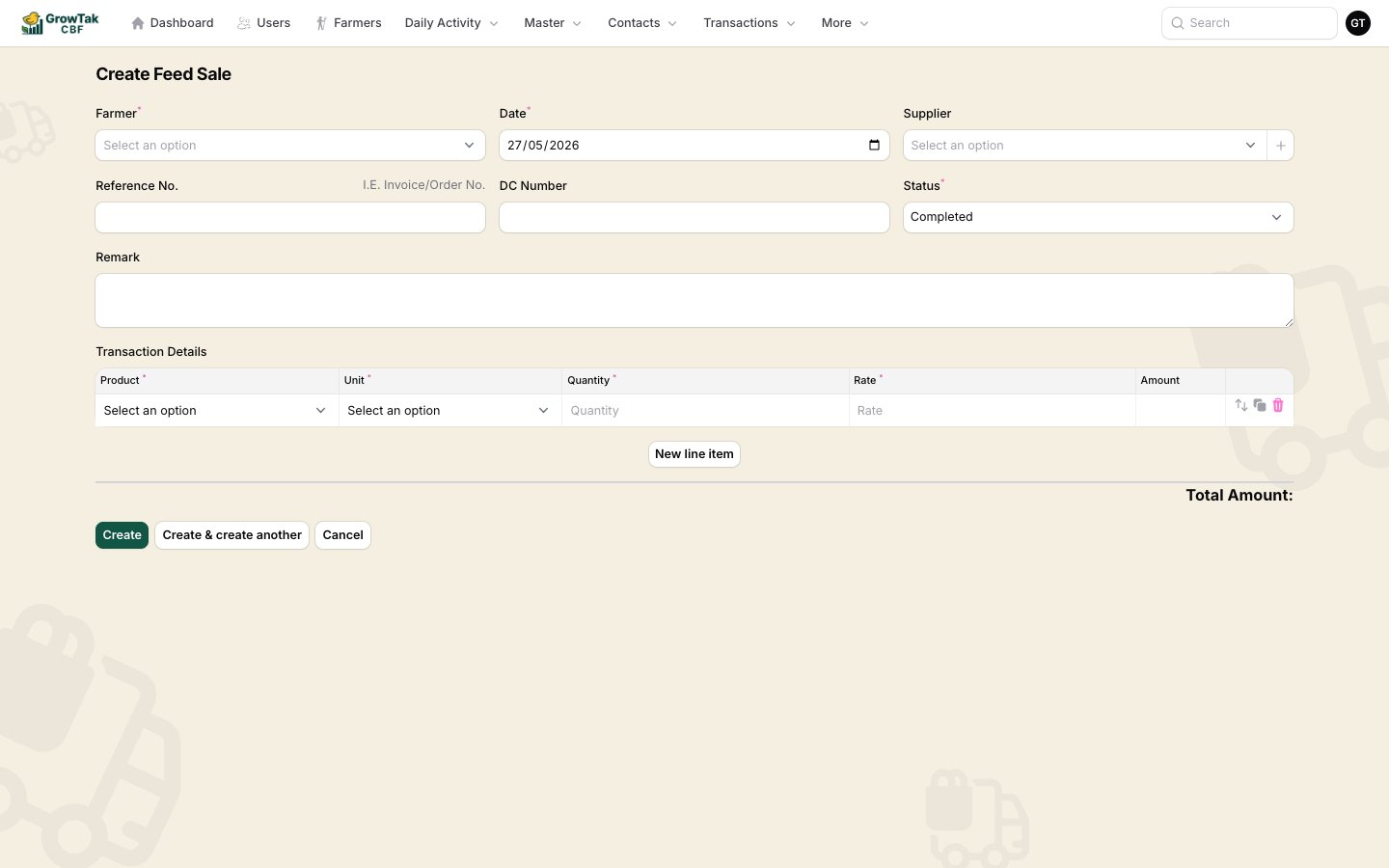 | Field | Notes |
| -------------------------------- | --------------------------------------------- |
| **Farmer / Batch** | The batch receiving the feed. |
| **Date** | Purchase/delivery date. |
| **Supplier** | Who supplied the feed (create inline if new). |
| **Reference No.**, **DC Number** | Document references. |
| **Status** | Leave as **Completed**. |
| **Remark** | Optional. |
**Line items:** **Product** (a feed grade), **Unit** (e.g. *Bag*), **Quantity**, **Rate**, **Amount**. Add a row per feed grade delivered.
The purchase increases the batch's feed stock and records the feed cost used in reports and GC.
## Feed Transfer
Moves feed **between batches** — for example, surplus feed from one farm sent to another, or feed issued from your central godown.
| Field | Notes |
| -------------------------------- | --------------------------------------------- |
| **Farmer / Batch** | The batch receiving the feed. |
| **Date** | Purchase/delivery date. |
| **Supplier** | Who supplied the feed (create inline if new). |
| **Reference No.**, **DC Number** | Document references. |
| **Status** | Leave as **Completed**. |
| **Remark** | Optional. |
**Line items:** **Product** (a feed grade), **Unit** (e.g. *Bag*), **Quantity**, **Rate**, **Amount**. Add a row per feed grade delivered.
The purchase increases the batch's feed stock and records the feed cost used in reports and GC.
## Feed Transfer
Moves feed **between batches** — for example, surplus feed from one farm sent to another, or feed issued from your central godown.
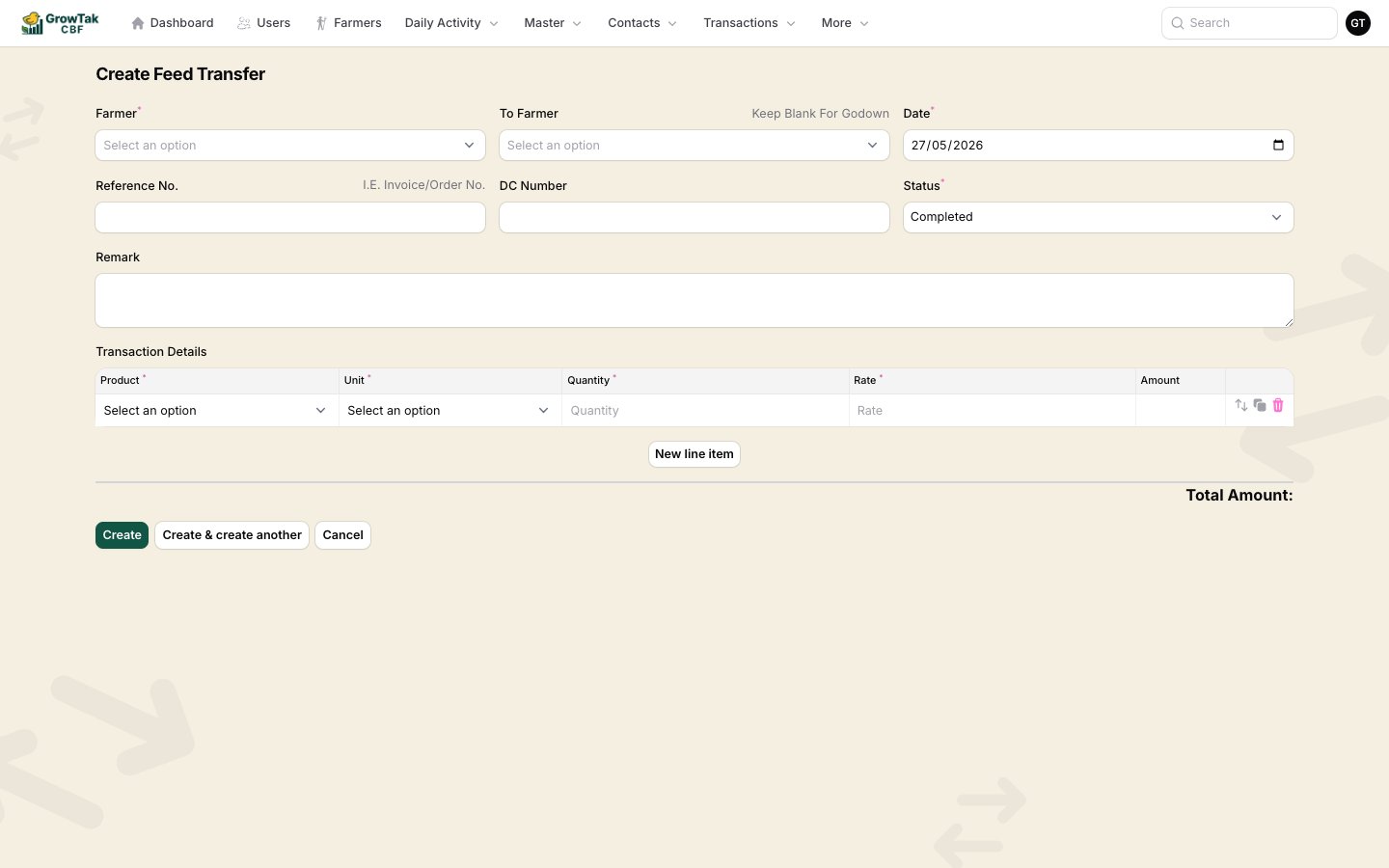 | Field | Notes |
| -------------------------------- | ------------------------------------------------------- |
| **From Farmer (Batch)** | The batch the feed leaves. |
| **To Farmer (To Batch)** | The batch the feed goes to. **Leave blank for godown.** |
| **Date** | Transfer date. |
| **Reference No.**, **DC Number** | Document references. |
| **Status** | Leave as **Completed**. |
| **Remark** | Optional. |
**Line items:** **Product**, **Unit**, **Quantity** — **no rate**, because a transfer moves stock without a new cost.
A transfer **reduces** the source batch's feed stock and **increases** the destination's. The feed's cost stays with the original purchase — transfers carry no money.
## Where feed stock shows up
After purchases and transfers, see the running balance on the batch's **Stock** tab, and the consumption vs availability on the **Projection** tab. Day entries then deduct what's actually eaten.
Set each batch's **feed lead time** and **safety stock** days (on the batch) so the **Projection** tab can warn you to reorder before a farm runs out.
| Field | Notes |
| -------------------------------- | ------------------------------------------------------- |
| **From Farmer (Batch)** | The batch the feed leaves. |
| **To Farmer (To Batch)** | The batch the feed goes to. **Leave blank for godown.** |
| **Date** | Transfer date. |
| **Reference No.**, **DC Number** | Document references. |
| **Status** | Leave as **Completed**. |
| **Remark** | Optional. |
**Line items:** **Product**, **Unit**, **Quantity** — **no rate**, because a transfer moves stock without a new cost.
A transfer **reduces** the source batch's feed stock and **increases** the destination's. The feed's cost stays with the original purchase — transfers carry no money.
## Where feed stock shows up
After purchases and transfers, see the running balance on the batch's **Stock** tab, and the consumption vs availability on the **Projection** tab. Day entries then deduct what's actually eaten.
Set each batch's **feed lead time** and **safety stock** days (on the batch) so the **Projection** tab can warn you to reorder before a farm runs out.