> ## Documentation Index
> Fetch the complete documentation index at: https://docs-cbf.growthtak.com/llms.txt
> Use this file to discover all available pages before exploring further.
# How transactions work
> The shared structure behind every purchase, sale, and transfer in GrowTak.
Transactions record everything that **moves in or out** of a batch — chicks, feed, and medicine. There are six types, all built the same way, so once you've learned one you've learned them all.
## The six transaction types
| Type | Direction | Default label | Covered in |
| --------------------- | ---------------------------------- | ----------------- | ----------------------------------------------- |
| **Bird Purchase** | Chicks **in** from a hatchery | Bird Purchase | [Chick placement](/transactions/bird-purchase) |
| **Bird Sale** | Grown birds **out** to a trader | Bird Sale | [Lifting & bird sale](/lifting-gc/bird-sale) |
| **Feed Purchase** | Feed **in** from a supplier | Feed Purchase | [Feed transactions](/transactions/feed) |
| **Feed Transfer** | Feed moved **between** batches | Feed Transfer | [Feed transactions](/transactions/feed) |
| **Medicine Purchase** | Medicine **in** from a supplier | Medicine Purchase | [Medicine transactions](/transactions/medicine) |
| **Medicine Transfer** | Medicine moved **between** batches | Medicine Transfer | [Medicine transactions](/transactions/medicine) |
Your company may have **renamed** these in [Company Settings](/setup/company-settings). The action is unchanged — this guide always uses the default names above.
## What every transaction has
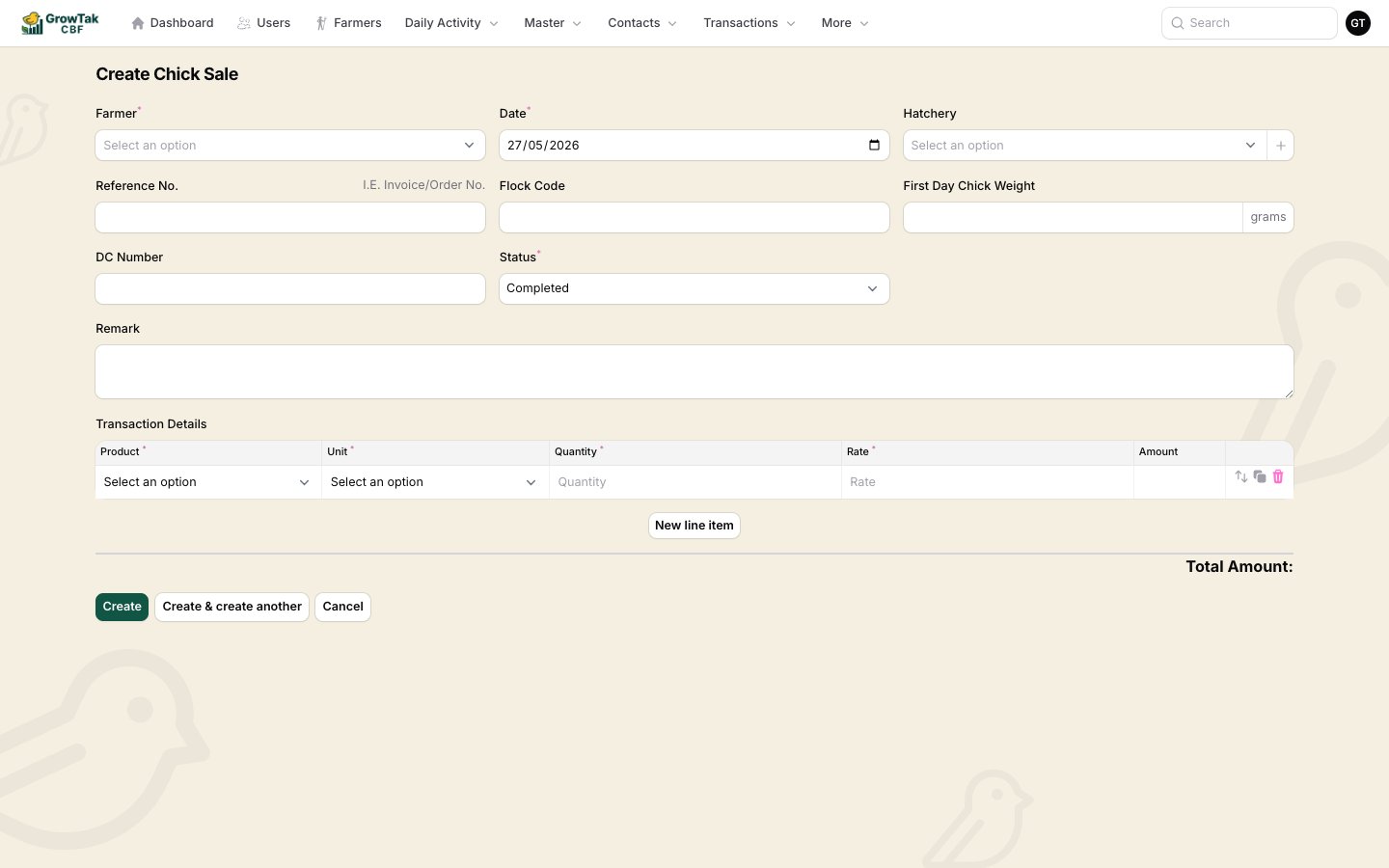 **Header fields:**
* **Farmer / Batch** — the batch the transaction belongs to.
* **Date** — defaults to today.
* **Contact** — the **supplier** (purchases), **trader** (bird sale), or destination **farmer** (transfers). For transfers, leaving it blank means *godown* (your own store).
* **Reference No.** — invoice/order number.
* **DC Number** — delivery challan number.
* **Status** — see below; defaults to **Completed**.
* **Remark** — optional notes.
**Line items (Transaction Details):** one or more rows, each with:
* **Product**, **Unit**, **Quantity**, **Rate**, and a calculated **Amount**.
* A **Total Amount** is summed at the bottom.
Add rows with **New line item**; use the clone/reorder/delete controls on each row.
Picking a product auto-fills its unit and pre-fills the rate from the product's default price. Change either as needed — switching the unit re-calculates the rate so the value stays consistent.
## Transaction status
| Status | Meaning |
| ---------------------------- | ------------------------------------------------------------------- |
| **Completed** | The default. Counts towards stock, costs, and reports. |
| **Processing** / **Shipped** | In-progress states that still count towards calculations. |
| **Pending** | A placeholder that is **ignored** in stock and report calculations. |
For everyday entry, leave the status as **Completed**.
## How transactions affect stock & cost
* **Purchases** add stock to the batch (birds, feed, or medicine) and record a **cost** (quantity × rate).
* **Sales** reduce bird count and record **revenue**.
* **Transfers** move stock from one batch to another (out of one, into the other) and carry **no rate** — they're a stock movement, not a purchase.
These feed the batch's **Stock** tab, the cost lines used in [GC calculation](/lifting-gc/gc-calculation), and the production/financial [reports](/reports/overview).
Transfers don't ask for a rate or amount — the cost stays with the original purchase. Only purchases and sales carry money.
**Header fields:**
* **Farmer / Batch** — the batch the transaction belongs to.
* **Date** — defaults to today.
* **Contact** — the **supplier** (purchases), **trader** (bird sale), or destination **farmer** (transfers). For transfers, leaving it blank means *godown* (your own store).
* **Reference No.** — invoice/order number.
* **DC Number** — delivery challan number.
* **Status** — see below; defaults to **Completed**.
* **Remark** — optional notes.
**Line items (Transaction Details):** one or more rows, each with:
* **Product**, **Unit**, **Quantity**, **Rate**, and a calculated **Amount**.
* A **Total Amount** is summed at the bottom.
Add rows with **New line item**; use the clone/reorder/delete controls on each row.
Picking a product auto-fills its unit and pre-fills the rate from the product's default price. Change either as needed — switching the unit re-calculates the rate so the value stays consistent.
## Transaction status
| Status | Meaning |
| ---------------------------- | ------------------------------------------------------------------- |
| **Completed** | The default. Counts towards stock, costs, and reports. |
| **Processing** / **Shipped** | In-progress states that still count towards calculations. |
| **Pending** | A placeholder that is **ignored** in stock and report calculations. |
For everyday entry, leave the status as **Completed**.
## How transactions affect stock & cost
* **Purchases** add stock to the batch (birds, feed, or medicine) and record a **cost** (quantity × rate).
* **Sales** reduce bird count and record **revenue**.
* **Transfers** move stock from one batch to another (out of one, into the other) and carry **no rate** — they're a stock movement, not a purchase.
These feed the batch's **Stock** tab, the cost lines used in [GC calculation](/lifting-gc/gc-calculation), and the production/financial [reports](/reports/overview).
Transfers don't ask for a rate or amount — the cost stays with the original purchase. Only purchases and sales carry money.