A tour of the batch view — overview charts and every analysis tab.
Opening a batch shows its dashboard: a header with actions, a row of tabs, and a default Overview of live performance. This is where you monitor a flock day to day.
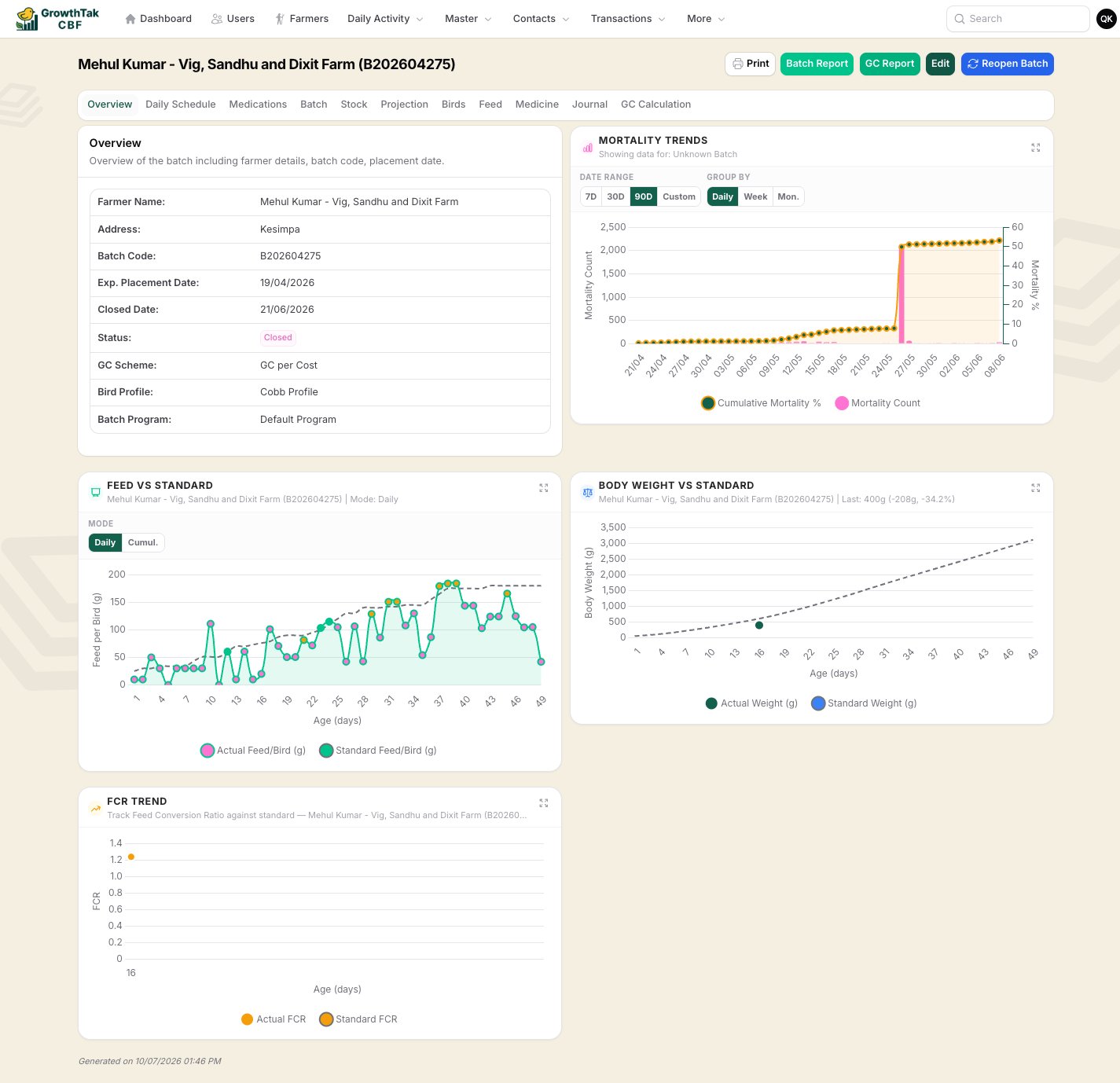
The batch Overview — farmer details plus mortality, feed, body-weight, and FCR-vs-standard charts.
Farmer & batch details (code, placement date, profile, program, GC scheme, status) plus the key charts: Mortality Trends, Feed vs Standard, Body Weight vs Standard, and FCR Trend — each comparing live data to the bird profile.
Daily Schedule
The batch program laid out against the flock’s calendar, showing what feed/medicine is due on each day and what’s been delivered.
Medications
Every medication/vaccination recorded for the batch, with products and quantities.
Batch
The detailed day-by-day performance table — bird stock, feed intake, body weight, FCR, and feed stock for every day, grouped by week, with actual figures alongside the standard.
The Batch tab — the full day-by-day performance table.
Stock
Current feed and medicine stock for the batch — purchased, consumed/transferred, and remaining, by product.
Projection
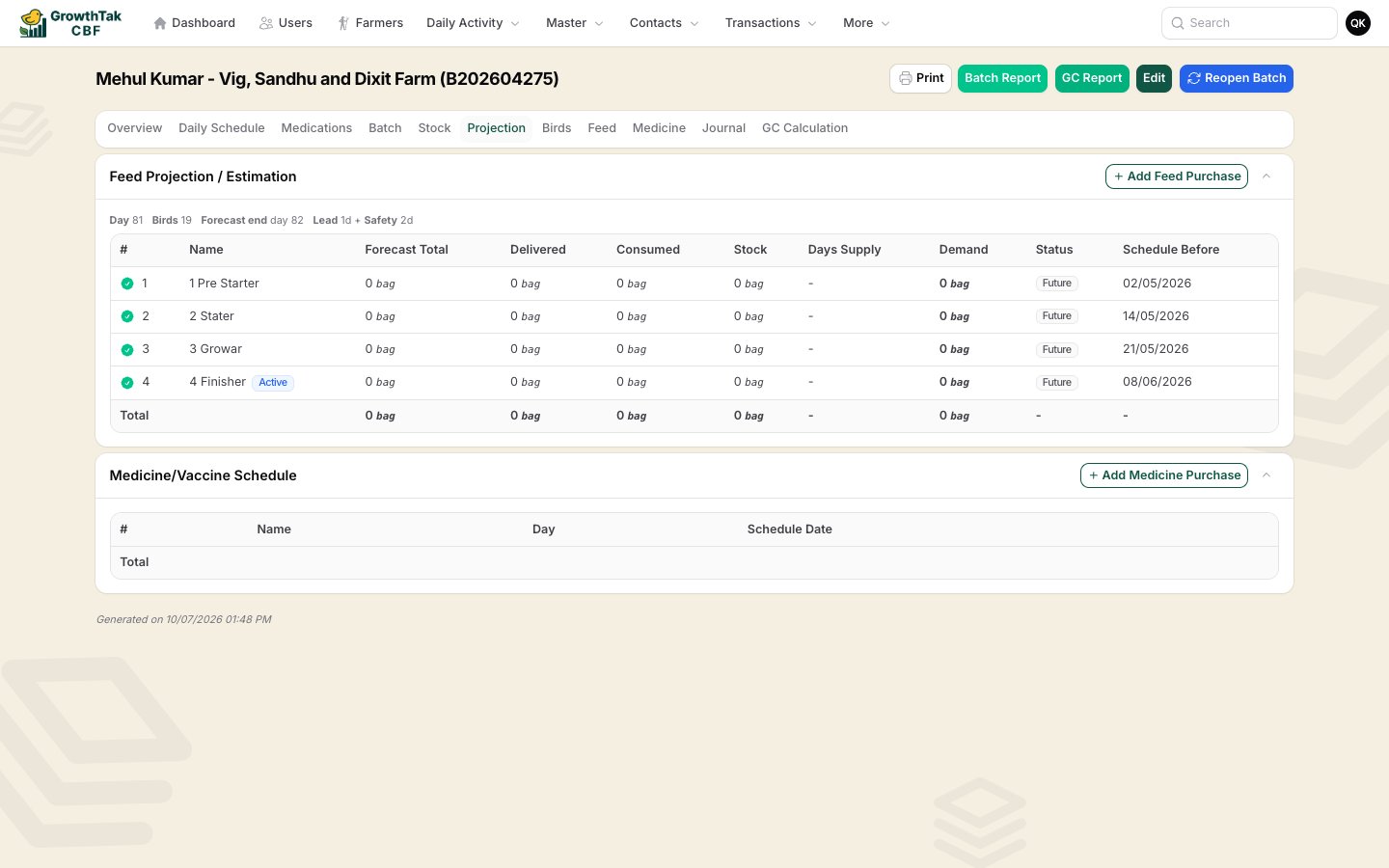
A feed-demand forecast per feed grade — forecast total, delivered, consumed, stock, days of supply, and a reorder status (Order Now / Order Soon / On Track), plus a Buy shortcut that opens a pre-filled feed purchase. The figures are calculated by the feed projection method set on the batch’s program. Also lists the medicine/vaccine schedule. See Feed projection.
The Projection tab — one row per feed grade, with forecast and reorder status.
Birds / Feed / Medicine
Three transaction logs — one each for bird, feed, and medicine movements on this batch.
Journal
A complete transaction journal for the batch. Visible only with the Journal & GC permission.
GC Calculation
The Grower Contract worksheet — performance vs standard, cost breakdown, and the calculated payment. Visible only with the Journal & GC permission. See GC calculation.
Within the transaction and day-entry logs on the batch, you can drill into and remove individual lines (a single day entry, a transaction line, or a medication line) without leaving the batch — handy for quick corrections.
The Overview charts are the quickest health check: if the actual line is tracking close to the dashed standard line on body weight and FCR, the flock is on plan.
Was this page helpful?
⌘I
{"docsConfig":{"theme":"almond","$schema":"https://mintlify.com/docs.json","name":"GrowthTak CBF User Guide","description":"End-user guide for the GrowthTak CBF poultry contract-farming management system — setup, farmers and batches, transactions, daily entry, Grower Contract (GC) calculation, and reports.","colors":{"primary":"#13604d","light":"#26BD6C","dark":"#0f4d3e"},"logo":{"light":"https://mintcdn.com/devharish/2y_JwsFKZG_HwQD_/logo/light.png?fit=max\u0026auto=format\u0026n=2y_JwsFKZG_HwQD_\u0026q=85\u0026s=d2f731043713492f10983e6f5d3134da","dark":"https://mintcdn.com/devharish/2y_JwsFKZG_HwQD_/logo/dark.png?fit=max\u0026auto=format\u0026n=2y_JwsFKZG_HwQD_\u0026q=85\u0026s=0e9f0adecc235e4e5a89a62854a334c4"},"favicon":"https://mintcdn.com/devharish/Guknf5aI_f54kcia/favicon.ico?fit=max\u0026auto=format\u0026n=Guknf5aI_f54kcia\u0026q=85\u0026s=867b135f0e1846bf57d966945ce22efe","navbar":{"links":[]},"footer":{"socials":{}},"styling":{"eyebrows":"breadcrumbs","latex":false},"contextual":{"options":["copy","view","chatgpt","claude","perplexity","grok","assistant"],"display":"header"},"navigation":{"pages":[]}},"deployment":{"deploymentMetadataValue":{"subdomain":"devharish","hasAudioNarration":false,"actualSubdomain":"devharish","customDomains":["docs-cbf.growthtak.com"],"gitSource":{"type":"github","owner":"harish81","repo":"growthtak-docs","deployBranch":"main","contentDirectory":"","isPrivate":true,"mountPath":"","label":""},"chroma":{"liveDeploymentHistoryId":"6a7299f868e7572c0dc973fe","collectionId":"8fb383ba-df22-4331-8ae5-ec93b891786b","schemaVersion":"v3","latestBuiltDeploymentHistoryId":"6a7299f868e7572c0dc973fe"},"feedback":{"thumbs":true},"entitlements":{"AI_CHAT":{"status":"DISABLED"}},"buildId":"6a7299f868e7572c0dc973fe:success","clientVersion":"0.0.3894","searchFilterCounts":[{"language":"default","tag":"Login \u0026 setup","count":7},{"language":"default","tag":"Lifting, GC \u0026 closing","count":6},{"language":"default","tag":"Farmers \u0026 batches","count":5},{"language":"default","tag":"Reports","count":5},{"language":"default","tag":"Daily entry","count":4},{"language":"default","tag":"Introduction","count":4},{"language":"default","tag":"Transactions","count":4}]},"assistantConfig":{"enableAskAiButton":false,"enableStarterQuestions":false,"enableContextualStarterQuestions":false,"enableAskAiSearchBar":true},"hasChatPermissions":false,"hasWebMcpPermissions":false,"toggles":[{"name":"kill-isr","enabled":true,"variant":{"name":"disabled","enabled":false,"feature_enabled":true},"impressionData":false},{"name":"agent-mintlify-slack","enabled":true,"variant":{"name":"disabled","enabled":false,"feature_enabled":true},"impressionData":false},{"name":"editor-v7-file-tree","enabled":true,"variant":{"name":"disabled","enabled":false,"feature_enabled":true},"impressionData":false},{"name":"agent-integrations-settings","enabled":true,"variant":{"name":"disabled","enabled":false,"feature_enabled":true},"impressionData":false},{"name":"automations-pr-grouping","enabled":true,"variant":{"name":"disabled","enabled":false,"feature_enabled":true},"impressionData":false},{"name":"custom-prefix","enabled":true,"variant":{"name":"disabled","enabled":false,"feature_enabled":true},"impressionData":false},{"name":"analytics-v7","enabled":true,"variant":{"name":"disabled","enabled":false,"feature_enabled":true},"impressionData":false},{"name":"user-flows-analytics","enabled":true,"variant":{"name":"disabled","enabled":false,"feature_enabled":true},"impressionData":false},{"name":"no-publish-flow","enabled":true,"variant":{"name":"disabled","enabled":false,"feature_enabled":true},"impressionData":false},{"name":"workos-onboarding","enabled":true,"variant":{"name":"disabled","enabled":false,"feature_enabled":true},"impressionData":false},{"name":"llms-txt-v2","enabled":true,"variant":{"name":"disabled","enabled":false,"feature_enabled":true},"impressionData":false},{"name":"pause-universal-search-reconcile","enabled":true,"variant":{"name":"disabled","enabled":false,"feature_enabled":true},"impressionData":false},{"name":"snapshot-serving-live","enabled":true,"variant":{"name":"disabled","enabled":false,"feature_enabled":true},"impressionData":false},{"name":"stripTemperatureMiddleware","enabled":true,"variant":{"name":"disabled","enabled":false,"feature_enabled":true},"impressionData":false},{"name":"per-site-search-delta","enabled":true,"variant":{"name":"disabled","enabled":false,"feature_enabled":true},"impressionData":false},{"name":"support-platform-pylon-zendesk","enabled":true,"variant":{"name":"disabled","enabled":false,"feature_enabled":true},"impressionData":false},{"name":"editor-branches-v2-autocommit","enabled":true,"variant":{"name":"disabled","enabled":false,"feature_enabled":true},"impressionData":false},{"name":"editor-branches-v2","enabled":true,"variant":{"name":"disabled","enabled":false,"feature_enabled":true},"impressionData":false},{"name":"snapshot-serving","enabled":true,"variant":{"name":"disabled","enabled":false,"feature_enabled":true},"impressionData":false},{"name":"instant-rollback","enabled":true,"variant":{"name":"disabled","enabled":false,"feature_enabled":true},"impressionData":false},{"name":"granular-notifications-server","enabled":true,"variant":{"name":"disabled","enabled":false,"feature_enabled":true},"impressionData":false},{"name":"granular-notifications","enabled":true,"variant":{"name":"disabled","enabled":false,"feature_enabled":true},"impressionData":false},{"name":"editor-private-page-search","enabled":true,"variant":{"name":"disabled","enabled":false,"feature_enabled":true},"impressionData":false},{"name":"automations-fable","enabled":true,"variant":{"name":"disabled","enabled":false,"feature_enabled":true},"impressionData":false},{"name":"fixed-ai-action-pricing","enabled":true,"variant":{"name":"disabled","enabled":false,"feature_enabled":true},"impressionData":false},{"name":"automation-resolve-merge-conflict","enabled":true,"variant":{"name":"disabled","enabled":false,"feature_enabled":true},"impressionData":false},{"name":"scoped-publishing","enabled":true,"variant":{"name":"disabled","enabled":false,"feature_enabled":true},"impressionData":false},{"name":"mintql","enabled":true,"variant":{"name":"disabled","enabled":false,"feature_enabled":true},"impressionData":false},{"name":"page-level-analytics","enabled":true,"variant":{"name":"disabled","enabled":false,"feature_enabled":true},"impressionData":false},{"name":"teamspace","enabled":true,"variant":{"name":"disabled","enabled":false,"feature_enabled":true},"impressionData":false},{"name":"editor-version-history-v2","enabled":true,"variant":{"name":"disabled","enabled":false,"feature_enabled":true},"impressionData":false},{"name":"vite-origin","enabled":true,"variant":{"name":"disabled","enabled":false,"feature_enabled":true},"impressionData":false},{"name":"editor-nav-generations","enabled":true,"variant":{"name":"disabled","enabled":false,"feature_enabled":true},"impressionData":false},{"name":"workspace-projects","enabled":true,"variant":{"name":"disabled","enabled":false,"feature_enabled":true},"impressionData":false},{"name":"assistant-v5","enabled":true,"variant":{"name":"disabled","enabled":false,"feature_enabled":true},"impressionData":false},{"name":"byok-sep-25","enabled":true,"variant":{"name":"disabled","enabled":false,"feature_enabled":true},"impressionData":false},{"name":"revalidation-jwt","enabled":true,"variant":{"name":"disabled","enabled":false,"feature_enabled":true},"impressionData":false},{"name":"editor-agent-model-picker","enabled":true,"variant":{"name":"disabled","enabled":false,"feature_enabled":true},"impressionData":false},{"name":"client-snapshot-docs-config","enabled":true,"variant":{"name":"disabled","enabled":false,"feature_enabled":true},"impressionData":false},{"name":"hobby-abuse-scan","enabled":true,"variant":{"name":"disabled","enabled":false,"feature_enabled":true},"impressionData":false}],"isAtlas":false,"googleFontsInlined":true},"customCss":[{"filePath":"style.css","content":":root{--default-border-color:var(--gray-200)}.dark{--default-border-color:var(--gray-800)}#sidebar .nav-dropdown-trigger{border:0!important;background:0 0!important;box-shadow:none!important;padding-left:.375rem}#sidebar .nav-dropdown-trigger:hover{background-color:rgb(0 0 0/.04)!important}.dark #sidebar .nav-dropdown-trigger:hover{background-color:rgb(255 255 255/.06)!important}#sidebar .nav-dropdown-trigger .nav-dropdown-item-icon,.nav-dropdown-content .nav-dropdown-item-icon{border:0!important;background:0 0!important;height:auto!important;width:auto!important;padding:0!important}.nav-dropdown-content .nav-dropdown-item-description{display:none!important}img.nav-logo{height:2.25rem;width:auto;max-width:none}"}],"page":{"pagePath":"farmers-batches/batch-dashboard","slug":"/farmers-batches/batch-dashboard","pageMetadata":{"title":"The batch dashboard","sidebarTitle":"Batch dashboard","description":"A tour of the batch view — overview charts and every analysis tab.","href":"/farmers-batches/batch-dashboard"},"description":{"compiledSource":"\"use strict\";\nconst {jsx: _jsx} = arguments[0];\nconst {useMDXComponents: _provideComponents} = arguments[0];\nfunction _createMdxContent(props) {\n const _components = {\n p: \"p\",\n ..._provideComponents(),\n ...props.components\n };\n return _jsx(_components.p, {\n children: \"A tour of the batch view — overview charts and every analysis tab.\"\n });\n}\nfunction MDXContent(props = {}) {\n const {wrapper: MDXLayout} = {\n ..._provideComponents(),\n ...props.components\n };\n return MDXLayout ? _jsx(MDXLayout, {\n ...props,\n children: _jsx(_createMdxContent, {\n ...props\n })\n }) : _createMdxContent(props);\n}\nreturn {\n default: MDXContent\n};\n","frontmatter":{},"scope":{}},"pageType":"default","mdx":{"mdxSource":{"compiledSource":"\"use strict\";const{Fragment:_Fragment,jsx:_jsx,jsxs:_jsxs}=arguments[0];const{useMDXComponents:_provideComponents}=arguments[0];function _createMdxContent(props){const _components={a:`a`,em:`em`,p:`p`,strong:`strong`,tbody:`tbody`,td:`td`,th:`th`,thead:`thead`,tr:`tr`,..._provideComponents(),...props.components},{Accordion,AccordionGroup,Frame,Heading,OptimizedImage,Table,Tip}=_components;if(!Accordion)_missingMdxReference(`Accordion`,true);if(!AccordionGroup)_missingMdxReference(`AccordionGroup`,true);if(!Frame)_missingMdxReference(`Frame`,true);if(!Heading)_missingMdxReference(`Heading`,true);if(!OptimizedImage)_missingMdxReference(`OptimizedImage`,true);if(!Table)_missingMdxReference(`Table`,true);if(!Tip)_missingMdxReference(`Tip`,true);return _jsxs(_Fragment,{children:[_jsxs(_components.p,{children:[`Opening a batch shows its `,_jsx(_components.strong,{children:`dashboard`}),`: a header with actions, a row of tabs, and a default `,_jsx(_components.strong,{children:`Overview`}),` of live performance. This is where you monitor a flock day to day.`]}),`\n`,_jsx(Frame,{caption:`The batch Overview — farmer details plus mortality, feed, body-weight, and FCR-vs-standard charts.`,children:_jsx(OptimizedImage,{src:`https://mintcdn.com/devharish/2y_JwsFKZG_HwQD_/images/guide/03-farmer-batch/batch-view-overview.png?fit=max\u0026auto=format\u0026n=2y_JwsFKZG_HwQD_\u0026q=85\u0026s=49e29bfce470babf65d94b006bb26568`,alt:`Batch overview`,\"data-og-width\":`1425`,width:`1425`,\"data-og-height\":`1378`,height:`1378`,\"data-path\":`images/guide/03-farmer-batch/batch-view-overview.png`,\"data-optimize\":`true`,\"data-opv\":`3`,srcset:`https://mintcdn.com/devharish/2y_JwsFKZG_HwQD_/images/guide/03-farmer-batch/batch-view-overview.png?w=280\u0026fit=max\u0026auto=format\u0026n=2y_JwsFKZG_HwQD_\u0026q=85\u0026s=335bab32c25fb5ef30d8fb567769d8a7 280w, https://mintcdn.com/devharish/2y_JwsFKZG_HwQD_/images/guide/03-farmer-batch/batch-view-overview.png?w=560\u0026fit=max\u0026auto=format\u0026n=2y_JwsFKZG_HwQD_\u0026q=85\u0026s=82221b2b59ad90d19e162f0f9c9080b3 560w, https://mintcdn.com/devharish/2y_JwsFKZG_HwQD_/images/guide/03-farmer-batch/batch-view-overview.png?w=840\u0026fit=max\u0026auto=format\u0026n=2y_JwsFKZG_HwQD_\u0026q=85\u0026s=6238851a5df2f6e8551f040c258cf9af 840w, https://mintcdn.com/devharish/2y_JwsFKZG_HwQD_/images/guide/03-farmer-batch/batch-view-overview.png?w=1100\u0026fit=max\u0026auto=format\u0026n=2y_JwsFKZG_HwQD_\u0026q=85\u0026s=9879974805b8c0cf21368b528d733151 1100w, https://mintcdn.com/devharish/2y_JwsFKZG_HwQD_/images/guide/03-farmer-batch/batch-view-overview.png?w=1650\u0026fit=max\u0026auto=format\u0026n=2y_JwsFKZG_HwQD_\u0026q=85\u0026s=b47425e36aa6321063f1273f4941b28f 1650w, https://mintcdn.com/devharish/2y_JwsFKZG_HwQD_/images/guide/03-farmer-batch/batch-view-overview.png?w=2500\u0026fit=max\u0026auto=format\u0026n=2y_JwsFKZG_HwQD_\u0026q=85\u0026s=a1aeab38132a4bd502a10606ed14eef0 2500w`})}),`\n`,_jsx(Heading,{level:`2`,id:`header-actions`,children:`Header actions`}),`\n`,_jsxs(Table,{children:[_jsx(_components.thead,{children:_jsxs(_components.tr,{children:[_jsx(_components.th,{children:`Action`}),_jsx(_components.th,{children:`What it does`})]})}),_jsxs(_components.tbody,{children:[_jsxs(_components.tr,{children:[_jsx(_components.td,{children:_jsx(_components.strong,{children:`Print`})}),_jsx(_components.td,{children:`Prints the current view.`})]}),_jsxs(_components.tr,{children:[_jsx(_components.td,{children:_jsx(_components.strong,{children:`Batch Report`})}),_jsx(_components.td,{children:`Opens the printable batch report.`})]}),_jsxs(_components.tr,{children:[_jsx(_components.td,{children:_jsx(_components.strong,{children:`Profit/Loss (GC) Report`})}),_jsx(_components.td,{children:`Opens the batch report focused on the GC figures.`})]}),_jsxs(_components.tr,{children:[_jsx(_components.td,{children:_jsx(_components.strong,{children:`Edit`})}),_jsx(_components.td,{children:`Edits the batch’s settings (profile, program, supervisors, etc.).`})]}),_jsxs(_components.tr,{children:[_jsx(_components.td,{children:_jsx(_components.strong,{children:`Close Batch / Reopen Batch`})}),_jsxs(_components.td,{children:[`Ends or reopens the cycle. See `,_jsx(_components.a,{href:`/lifting-gc/closing-a-batch`,children:`Closing a batch`}),`.`]})]})]})]}),`\n`,_jsx(Heading,{level:`2`,id:`the-tabs`,children:`The tabs`}),`\n`,_jsxs(AccordionGroup,{children:[_jsx(Accordion,{title:`Overview`,icon:`chart-line`,id:`overview`,children:_jsxs(_components.p,{children:[`Farmer \u0026 batch details (code, placement date, profile, program, GC scheme, status) plus the key charts: `,_jsx(_components.strong,{children:`Mortality Trends`}),`, `,_jsx(_components.strong,{children:`Feed vs Standard`}),`, `,_jsx(_components.strong,{children:`Body Weight vs Standard`}),`, and `,_jsx(_components.strong,{children:`FCR Trend`}),` — each comparing live data to the bird profile.`]})}),_jsx(Accordion,{title:`Daily Schedule`,icon:`calendar-days`,id:`daily-schedule`,children:_jsx(_components.p,{children:`The batch program laid out against the flock’s calendar, showing what feed/medicine is due on each day and what’s been delivered.`})}),_jsx(Accordion,{title:`Medications`,icon:`syringe`,id:`medications`,children:_jsx(_components.p,{children:`Every medication/vaccination recorded for the batch, with products and quantities.`})}),_jsxs(Accordion,{title:`Batch`,icon:`table`,id:`batch`,children:[_jsxs(_components.p,{children:[`The detailed `,_jsx(_components.strong,{children:`day-by-day performance table`}),` — bird stock, feed intake, body weight, FCR, and feed stock for every day, grouped by week, with actual figures alongside the standard.`]}),_jsx(Frame,{caption:`The Batch tab — the full day-by-day performance table.`,children:_jsx(OptimizedImage,{src:`https://mintcdn.com/devharish/2y_JwsFKZG_HwQD_/images/guide/03-farmer-batch/batch-tab-batch-report.png?fit=max\u0026auto=format\u0026n=2y_JwsFKZG_HwQD_\u0026q=85\u0026s=82c9b24c8108279c3f06254cd60d278b`,alt:`Batch report tab`,\"data-og-width\":`1425`,width:`1425`,\"data-og-height\":`1558`,height:`1558`,\"data-path\":`images/guide/03-farmer-batch/batch-tab-batch-report.png`,\"data-optimize\":`true`,\"data-opv\":`3`,srcset:`https://mintcdn.com/devharish/2y_JwsFKZG_HwQD_/images/guide/03-farmer-batch/batch-tab-batch-report.png?w=280\u0026fit=max\u0026auto=format\u0026n=2y_JwsFKZG_HwQD_\u0026q=85\u0026s=8c4be3f20fda84663c4b39aab70e0b68 280w, https://mintcdn.com/devharish/2y_JwsFKZG_HwQD_/images/guide/03-farmer-batch/batch-tab-batch-report.png?w=560\u0026fit=max\u0026auto=format\u0026n=2y_JwsFKZG_HwQD_\u0026q=85\u0026s=374597a1544d167e4a24f2d43431e697 560w, https://mintcdn.com/devharish/2y_JwsFKZG_HwQD_/images/guide/03-farmer-batch/batch-tab-batch-report.png?w=840\u0026fit=max\u0026auto=format\u0026n=2y_JwsFKZG_HwQD_\u0026q=85\u0026s=f252b22f0c3d7b8133bbe1a96d54139d 840w, https://mintcdn.com/devharish/2y_JwsFKZG_HwQD_/images/guide/03-farmer-batch/batch-tab-batch-report.png?w=1100\u0026fit=max\u0026auto=format\u0026n=2y_JwsFKZG_HwQD_\u0026q=85\u0026s=da903fe39dad30a5563c421e703f9dba 1100w, https://mintcdn.com/devharish/2y_JwsFKZG_HwQD_/images/guide/03-farmer-batch/batch-tab-batch-report.png?w=1650\u0026fit=max\u0026auto=format\u0026n=2y_JwsFKZG_HwQD_\u0026q=85\u0026s=40cdb196e07f6ad3bc63dc602754a3f0 1650w, https://mintcdn.com/devharish/2y_JwsFKZG_HwQD_/images/guide/03-farmer-batch/batch-tab-batch-report.png?w=2500\u0026fit=max\u0026auto=format\u0026n=2y_JwsFKZG_HwQD_\u0026q=85\u0026s=b27a5a908fd6d8bd4229c8ae736fd0d8 2500w`})})]}),_jsx(Accordion,{title:`Stock`,icon:`boxes-stacked`,id:`stock`,children:_jsxs(_components.p,{children:[`Current `,_jsx(_components.strong,{children:`feed and medicine stock`}),` for the batch — purchased, consumed/transferred, and remaining, by product.`]})}),_jsxs(Accordion,{title:`Projection`,icon:`chart-area`,id:`projection`,children:[_jsxs(_components.p,{children:[`A `,_jsx(_components.strong,{children:`feed-demand forecast`}),` per feed grade — forecast total, delivered, consumed, stock, `,_jsx(_components.strong,{children:`days of supply`}),`, and a reorder `,_jsx(_components.strong,{children:`status`}),` (`,_jsx(_components.em,{children:`Order Now`}),` / `,_jsx(_components.em,{children:`Order Soon`}),` / `,_jsx(_components.em,{children:`On Track`}),`), plus a `,_jsx(_components.strong,{children:`Buy`}),` shortcut that opens a pre-filled feed purchase. The figures are calculated by the `,_jsx(_components.a,{href:`/setup/batch-programs#feed-projection-method`,children:`feed projection method`}),` set on the batch’s program. Also lists the medicine/vaccine schedule. See `,_jsx(_components.a,{href:`/farmers-batches/feed-projection`,children:`Feed projection`}),`.`]}),_jsx(Frame,{caption:`The Projection tab — one row per feed grade, with forecast and reorder status.`,children:_jsx(OptimizedImage,{src:`https://mintcdn.com/devharish/2y_JwsFKZG_HwQD_/images/guide/03-farmer-batch/batch-tab-projection.png?fit=max\u0026auto=format\u0026n=2y_JwsFKZG_HwQD_\u0026q=85\u0026s=f04b19aa42304fe90c68f9caf89b0318`,alt:`Feed projection tab`,\"data-og-width\":`1440`,width:`1440`,\"data-og-height\":`900`,height:`900`,\"data-path\":`images/guide/03-farmer-batch/batch-tab-projection.png`,\"data-optimize\":`true`,\"data-opv\":`3`,srcset:`https://mintcdn.com/devharish/2y_JwsFKZG_HwQD_/images/guide/03-farmer-batch/batch-tab-projection.png?w=280\u0026fit=max\u0026auto=format\u0026n=2y_JwsFKZG_HwQD_\u0026q=85\u0026s=6ee91e1debe3cf628e9b324eefde4819 280w, https://mintcdn.com/devharish/2y_JwsFKZG_HwQD_/images/guide/03-farmer-batch/batch-tab-projection.png?w=560\u0026fit=max\u0026auto=format\u0026n=2y_JwsFKZG_HwQD_\u0026q=85\u0026s=d7ace569a0b2b1b2b0d3f8e1ad3f13c8 560w, https://mintcdn.com/devharish/2y_JwsFKZG_HwQD_/images/guide/03-farmer-batch/batch-tab-projection.png?w=840\u0026fit=max\u0026auto=format\u0026n=2y_JwsFKZG_HwQD_\u0026q=85\u0026s=8fedafba5276ff7898c1157150b00ccc 840w, https://mintcdn.com/devharish/2y_JwsFKZG_HwQD_/images/guide/03-farmer-batch/batch-tab-projection.png?w=1100\u0026fit=max\u0026auto=format\u0026n=2y_JwsFKZG_HwQD_\u0026q=85\u0026s=5ba824ad23efade85542ecdfb16cb31d 1100w, https://mintcdn.com/devharish/2y_JwsFKZG_HwQD_/images/guide/03-farmer-batch/batch-tab-projection.png?w=1650\u0026fit=max\u0026auto=format\u0026n=2y_JwsFKZG_HwQD_\u0026q=85\u0026s=ef1d1b58beb494c7e0b6c1af7410cbe1 1650w, https://mintcdn.com/devharish/2y_JwsFKZG_HwQD_/images/guide/03-farmer-batch/batch-tab-projection.png?w=2500\u0026fit=max\u0026auto=format\u0026n=2y_JwsFKZG_HwQD_\u0026q=85\u0026s=8cc2bc4e96329f11783f40170406c499 2500w`})})]}),_jsx(Accordion,{title:`Birds / Feed / Medicine`,icon:`list`,id:`birds-feed-medicine`,children:_jsx(_components.p,{children:`Three transaction logs — one each for bird, feed, and medicine movements on this batch.`})}),_jsx(Accordion,{title:`Journal`,icon:`book`,id:`journal`,children:_jsxs(_components.p,{children:[`A complete transaction journal for the batch. Visible only with the `,_jsx(_components.strong,{children:`Journal \u0026 GC`}),` permission.`]})}),_jsx(Accordion,{title:`GC Calculation`,icon:`scale-balanced`,id:`gc-calculation`,children:_jsxs(_components.p,{children:[`The Grower Contract worksheet — performance vs standard, cost breakdown, and the calculated payment. Visible only with the `,_jsx(_components.strong,{children:`Journal \u0026 GC`}),` permission. See `,_jsx(_components.a,{href:`/lifting-gc/gc-calculation`,children:`GC calculation`}),`.`]})})]}),`\n`,_jsx(Heading,{level:`2`,id:`editing-entries-from-the-dashboard`,children:`Editing entries from the dashboard`}),`\n`,_jsx(_components.p,{children:`Within the transaction and day-entry logs on the batch, you can drill into and remove individual lines (a single day entry, a transaction line, or a medication line) without leaving the batch — handy for quick corrections.`}),`\n`,_jsx(Tip,{children:_jsxs(_components.p,{children:[`The `,_jsx(_components.strong,{children:`Overview charts`}),` are the quickest health check: if the actual line is tracking close to the dashed standard line on body weight and FCR, the flock is on plan.`]})})]})}function MDXContent(props={}){const{wrapper:MDXLayout}={..._provideComponents(),...props.components};return MDXLayout?_jsx(MDXLayout,{...props,children:_jsx(_createMdxContent,{...props})}):_createMdxContent(props)}return{default:MDXContent};function _missingMdxReference(id,component){throw new Error(`Expected `+(component?`component`:`object`)+\" `\"+id+\"` to be defined: you likely forgot to import, pass, or provide it.\")}","frontmatter":{},"scope":{"config":{},"pageMetadata":{"title":"The batch dashboard","sidebarTitle":"Batch dashboard","description":"A tour of the batch view — overview charts and every analysis tab.","href":"/farmers-batches/batch-dashboard"}}},"mdxSourceWithNoJs":null},"mdxExtracts":{"tableOfContents":[{"title":"Header actions","slug":"header-actions","depth":2,"children":[]},{"title":"The tabs","slug":"the-tabs","depth":2,"children":[]},{"title":"Editing entries from the dashboard","slug":"editing-entries-from-the-dashboard","depth":2,"children":[]}],"codeExamples":{}},"jsLinks":[],"subdomain":"devharish","siteName":"GrowthTak CBF User Guide","title":"The batch dashboard - GrowthTak CBF User Guide","navMaps":{"firstHrefInVersion":{},"firstHrefInLanguage":{}},"lastModified":"2026-08-05T02:03:52.741Z","originalFileLocation":"farmers-batches/batch-dashboard.mdx"},"headHtml":"\u003cmeta data-mint-head name=\"description\" content=\"A tour of the batch view — overview charts and every analysis tab.\">\u003cmeta data-mint-head name=\"application-name\" content=\"GrowthTak CBF User Guide\">\u003cmeta data-mint-head name=\"generator\" content=\"Mintlify\">\u003clink data-mint-head rel=\"icon\" type=\"image/png\" sizes=\"192x192\" href=\"/mintlify-assets/_mintlify/favicons/devharish/K1_5F3zDTAOYOXEO/_generated/favicon/android-chrome-192x192.png\" media=\"(prefers-color-scheme: light)\">\u003clink data-mint-head rel=\"apple-touch-icon\" type=\"image/png\" sizes=\"180x180\" href=\"/mintlify-assets/_mintlify/favicons/devharish/K1_5F3zDTAOYOXEO/_generated/favicon/apple-touch-icon.png\">\u003clink data-mint-head rel=\"icon\" type=\"image/png\" sizes=\"16x16\" href=\"/mintlify-assets/_mintlify/favicons/devharish/K1_5F3zDTAOYOXEO/_generated/favicon/favicon-16x16.png\" media=\"(prefers-color-scheme: light)\">\u003clink data-mint-head rel=\"icon\" type=\"image/png\" sizes=\"32x32\" href=\"/mintlify-assets/_mintlify/favicons/devharish/K1_5F3zDTAOYOXEO/_generated/favicon/favicon-32x32.png\" media=\"(prefers-color-scheme: light)\">\u003clink data-mint-head rel=\"shortcut icon\" type=\"image/x-icon\" href=\"/mintlify-assets/_mintlify/favicons/devharish/K1_5F3zDTAOYOXEO/_generated/favicon/favicon.ico\" media=\"(prefers-color-scheme: light)\">\u003clink data-mint-head rel=\"icon\" type=\"image/png\" sizes=\"192x192\" href=\"/mintlify-assets/_mintlify/favicons/devharish/K1_5F3zDTAOYOXEO/_generated/favicon-dark/android-chrome-192x192.png\" media=\"(prefers-color-scheme: dark)\">\u003clink data-mint-head rel=\"icon\" type=\"image/png\" sizes=\"16x16\" href=\"/mintlify-assets/_mintlify/favicons/devharish/K1_5F3zDTAOYOXEO/_generated/favicon-dark/favicon-16x16.png\" media=\"(prefers-color-scheme: dark)\">\u003clink data-mint-head rel=\"icon\" type=\"image/png\" sizes=\"32x32\" href=\"/mintlify-assets/_mintlify/favicons/devharish/K1_5F3zDTAOYOXEO/_generated/favicon-dark/favicon-32x32.png\" media=\"(prefers-color-scheme: dark)\">\u003clink data-mint-head rel=\"shortcut icon\" type=\"image/x-icon\" href=\"/mintlify-assets/_mintlify/favicons/devharish/K1_5F3zDTAOYOXEO/_generated/favicon-dark/favicon.ico\" media=\"(prefers-color-scheme: dark)\">\u003cmeta data-mint-head property=\"og:title\" content=\"The batch dashboard - GrowthTak CBF User Guide\">\u003cmeta data-mint-head property=\"og:description\" content=\"A tour of the batch view — overview charts and every analysis tab.\">\u003cmeta data-mint-head property=\"og:site_name\" content=\"GrowthTak CBF User Guide\">\u003cmeta data-mint-head property=\"og:url\" content=\"https://docs-cbf.growthtak.com/farmers-batches/batch-dashboard\">\u003cmeta data-mint-head property=\"og:type\" content=\"website\">\u003cmeta data-mint-head name=\"twitter:card\" content=\"summary_large_image\">\u003cmeta data-mint-head name=\"twitter:title\" content=\"The batch dashboard - GrowthTak CBF User Guide\">\u003cmeta data-mint-head name=\"twitter:description\" content=\"A tour of the batch view — overview charts and every analysis tab.\">\u003cmeta data-mint-head name=\"msapplication-config\" content=\"/mintlify-assets/_mintlify/favicons/devharish/K1_5F3zDTAOYOXEO/_generated/favicon/browserconfig.xml\">\u003cmeta data-mint-head name=\"apple-mobile-web-app-title\" content=\"GrowthTak CBF User Guide\">\u003cmeta data-mint-head name=\"msapplication-TileColor\" content=\"#13604d\">\u003clink data-mint-head rel=\"canonical\" href=\"https://docs-cbf.growthtak.com/farmers-batches/batch-dashboard\">\u003clink data-mint-head rel=\"alternate\" type=\"application/xml\" href=\"/sitemap.xml\">\u003clink data-mint-head rel=\"alternate\" type=\"text/markdown\" href=\"/farmers-batches/batch-dashboard.md\">\u003cscript data-mint-head type=\"application/ld+json\">{\"@context\":\"https://schema.org\",\"@graph\":[{\"@type\":\"Organization\",\"@id\":\"https://docs-cbf.growthtak.com/#organization\",\"name\":\"GrowthTak CBF User Guide\",\"url\":\"https://docs-cbf.growthtak.com\",\"logo\":{\"@type\":\"ImageObject\",\"url\":\"https://mintcdn.com/devharish/2y_JwsFKZG_HwQD_/logo/light.png?fit=max\u0026auto=format\u0026n=2y_JwsFKZG_HwQD_\u0026q=85\u0026s=d2f731043713492f10983e6f5d3134da\"}},{\"@type\":\"WebSite\",\"@id\":\"https://docs-cbf.growthtak.com#website\",\"name\":\"GrowthTak CBF User Guide\",\"url\":\"https://docs-cbf.growthtak.com\",\"publisher\":{\"@id\":\"https://docs-cbf.growthtak.com/#organization\"}},{\"@type\":\"WebPage\",\"@id\":\"https://docs-cbf.growthtak.com/farmers-batches/batch-dashboard#webpage\",\"url\":\"https://docs-cbf.growthtak.com/farmers-batches/batch-dashboard\",\"name\":\"The batch dashboard\",\"description\":\"A tour of the batch view — overview charts and every analysis tab.\",\"dateModified\":\"2026-08-05T02:03:52.741Z\",\"isPartOf\":{\"@id\":\"https://docs-cbf.growthtak.com#website\"},\"breadcrumb\":{\"@id\":\"https://docs-cbf.growthtak.com/farmers-batches/batch-dashboard#breadcrumb\"}},{\"@type\":\"BreadcrumbList\",\"@id\":\"https://docs-cbf.growthtak.com/farmers-batches/batch-dashboard#breadcrumb\",\"itemListElement\":[{\"@type\":\"ListItem\",\"position\":1,\"name\":\"Farmers \u0026 batches\",\"item\":\"https://docs-cbf.growthtak.com/farmers-batches/contacts\"},{\"@type\":\"ListItem\",\"position\":2,\"name\":\"The batch dashboard\",\"item\":\"https://docs-cbf.growthtak.com/farmers-batches/batch-dashboard\"}]},{\"@type\":[\"Article\",\"TechArticle\"],\"@id\":\"https://docs-cbf.growthtak.com/farmers-batches/batch-dashboard#article\",\"headline\":\"The batch dashboard\",\"name\":\"The batch dashboard\",\"description\":\"A tour of the batch view — overview charts and every analysis tab.\",\"url\":\"https://docs-cbf.growthtak.com/farmers-batches/batch-dashboard\",\"mainEntityOfPage\":{\"@id\":\"https://docs-cbf.growthtak.com/farmers-batches/batch-dashboard#webpage\"},\"dateModified\":\"2026-08-05T02:03:52.741Z\",\"publisher\":{\"@id\":\"https://docs-cbf.growthtak.com/#organization\"},\"isPartOf\":{\"@id\":\"https://docs-cbf.growthtak.com#website\"}}]}\u003c/script>\u003cscript data-mint-head type=\"application/ld+json\">{\"@context\":\"https://schema.org\",\"@type\":\"WebSite\",\"name\":\"GrowthTak CBF User Guide\",\"creator\":{\"@type\":\"Organization\",\"name\":\"Mintlify\",\"url\":\"https://mintlify.com\"}}\u003c/script>","siteName":"GrowthTak CBF User Guide","nav":{"global":null,"groups":[{"group":"Introduction","icon":"book-open","pages":[{"title":"GrowthTak CBF User Guide","sidebarTitle":"Welcome","href":"/index"},{"title":"What is GrowthTak CBF?","sidebarTitle":"Overview","href":"/introduction/overview"},{"title":"Key concepts \u0026 glossary","sidebarTitle":"Key concepts","href":"/introduction/key-concepts"},{"title":"Finding your way around","sidebarTitle":"Navigating GrowthTak CBF","href":"/introduction/navigating"}]},{"group":"Login \u0026 setup","icon":"gear","pages":[{"title":"Signing in \u0026 your profile","sidebarTitle":"Signing in","href":"/setup/logging-in"},{"title":"Company settings","sidebarTitle":"Company settings","href":"/setup/company-settings"},{"title":"Users, roles \u0026 permissions","sidebarTitle":"Users \u0026 roles","href":"/setup/users-and-roles"},{"title":"Products \u0026 units","sidebarTitle":"Products","href":"/setup/products"},{"title":"Bird profiles (standard growth curve)","sidebarTitle":"Bird profiles","href":"/setup/product-profiles"},{"title":"Batch programs (feed \u0026 vaccine schedule)","sidebarTitle":"Batch programs","href":"/setup/batch-programs"},{"title":"Menu builder","sidebarTitle":"Menu builder","href":"/setup/menu-builder"}]},{"group":"Farmers \u0026 batches","icon":"wheat-awn","pages":[{"title":"Contacts — farmers, suppliers \u0026 traders","sidebarTitle":"Contacts","href":"/farmers-batches/contacts"},{"title":"Farmers","sidebarTitle":"Farmers","href":"/farmers-batches/farmers"},{"title":"Creating a batch","sidebarTitle":"Creating a batch","description":"Start a new flock by creating a batch and linking it to a farmer, profile, program, and GC scheme.","href":"/farmers-batches/creating-batches"},{"title":"The batch dashboard","sidebarTitle":"Batch dashboard","href":"/farmers-batches/batch-dashboard"},{"title":"Feed projection \u0026 reorder alerts","sidebarTitle":"Feed projection","description":"Forecast how much feed each batch still needs, see how many days of stock are left, and reorder before a farm runs out.","href":"/farmers-batches/feed-projection"}]},{"group":"Transactions","icon":"truck","pages":[{"title":"How transactions work","sidebarTitle":"Overview","href":"/transactions/overview"},{"title":"Chick placement (Bird Purchase)","sidebarTitle":"Chick placement","href":"/transactions/bird-purchase"},{"title":"Feed transactions","sidebarTitle":"Feed purchase \u0026 transfer","href":"/transactions/feed"},{"title":"Medicine transactions","sidebarTitle":"Medicine purchase \u0026 transfer","href":"/transactions/medicine"}]},{"group":"Daily entry","icon":"calendar-days","pages":[{"title":"Recording a day entry","sidebarTitle":"Recording a day entry","href":"/daily-entry/recording-a-day-entry"},{"title":"Body weight \u0026 sampling","sidebarTitle":"Body weight \u0026 sampling","href":"/daily-entry/weight-sampling"},{"title":"GPS tagging of visits","sidebarTitle":"GPS tagging","href":"/daily-entry/gps-tagging"},{"title":"Medications","sidebarTitle":"Medications","href":"/daily-entry/medications"}]},{"group":"Lifting, GC \u0026 closing","icon":"scale-balanced","pages":[{"title":"Lifting intents","sidebarTitle":"Lifting intents","href":"/lifting-gc/lifting-intents"},{"title":"Bird sale","sidebarTitle":"Bird sale","href":"/lifting-gc/bird-sale"},{"title":"GC schemes","sidebarTitle":"GC schemes","href":"/lifting-gc/gc-schemes"},{"title":"Calculating the GC","sidebarTitle":"GC calculation","href":"/lifting-gc/gc-calculation"},{"title":"Payments \u0026 loans","sidebarTitle":"Payments \u0026 loans","href":"/lifting-gc/payments"},{"title":"Closing a batch","sidebarTitle":"Closing a batch","href":"/lifting-gc/closing-a-batch"}]},{"group":"Reports","icon":"chart-column","pages":[{"title":"Reports overview","sidebarTitle":"Overview","href":"/reports/overview"},{"title":"Production reports","sidebarTitle":"Production reports","href":"/reports/production-reports"},{"title":"GC \u0026 lifting reports","sidebarTitle":"GC \u0026 lifting reports","href":"/reports/gc-reports"},{"title":"Financial reports","sidebarTitle":"Financial reports","href":"/reports/financial-reports"},{"title":"Operational reports","sidebarTitle":"Operational reports","href":"/reports/operational-reports"}]}]},"title":"The batch dashboard - GrowthTak CBF User Guide","buildId":"dpl_8LJVMfxYNq6LJkohTrn2iyWT8umj","deploymentId":"dpl_8LJVMfxYNq6LJkohTrn2iyWT8umj","dynamics":["07c022d89b","a74be98ba7"],"chunks":["Frame-DgIorxK1.js","DynamicMarkdown-43fmNsOD.js","zoom-image-lightbox-D9lJgLSo.js","PlusIcon-C1lem43w.js","lightbox-handle-r17bVUz3.js"]}