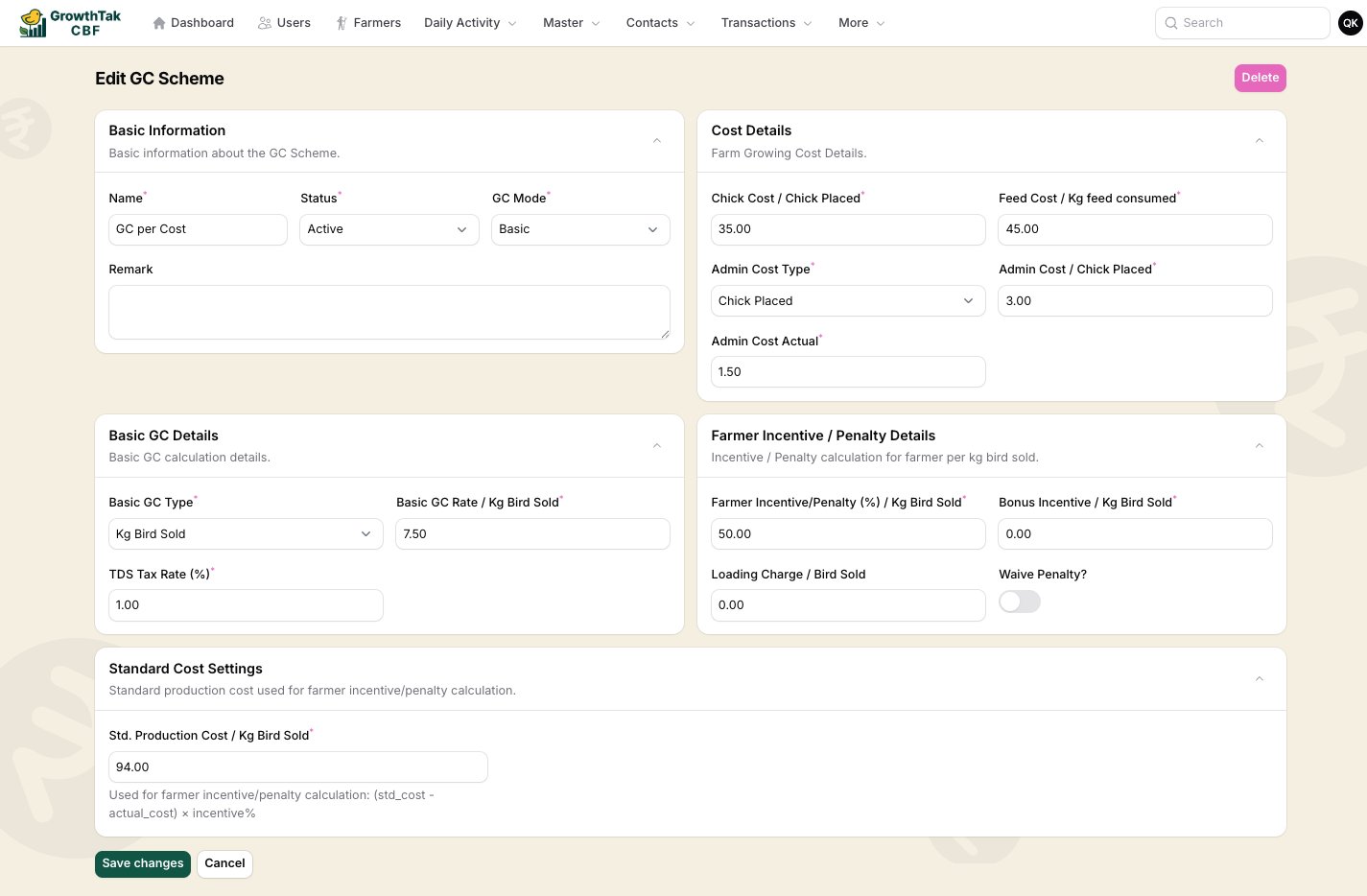
Managing GC schemes is admin only. Find it under Master → GC Schemes.
A GC (Grower Contract) scheme is the rule set that decides how much a farmer is paid for a batch. You build a scheme once and attach it to batches; at the end of each batch GrowTak uses the scheme to calculate the payment. Every scheme works in one of two modes:

Basic mode

Fill in fixed rates, an incentive/penalty rule, and tax. Simple, predictable, and enough for most contracts.

Advanced mode

Build the payment from formula-driven components with optional conditions. Powerful for complex, tiered, or unusual contracts.

Fields common to both modes

Basic Information
FieldNotes
Namee.g. Standard Broiler 2026.
StatusActive schemes can be attached to batches.
GC ModeBasic or Advanced — switches which sections appear.
RemarkOptional.
Cost Details — the company’s growing costs, used to work out production cost per kg:
FieldMeaning
Chick Cost / Chick PlacedCost of each chick.
Feed Cost / Kg feed consumedCost per kg of feed.
Admin Cost TypeThe basis for admin/overhead — Chick Placed, Bird Sold, or Kg Bird Sold.
Admin CostThe scheme’s admin rate on that basis.
Admin Cost ActualThe actual admin rate to use in the real calculation.

Basic mode

Basic GC scheme
Basic GC Details
FieldMeaning
Basic GC TypeWhat the base rate is charged on — Kg Bird Sold, Bird Sold, or Chick Placed.
Basic GC RateThe base payment per that unit.
TDS Tax Rate (%)Tax withheld from the GC.
Farmer Incentive / Penalty Details
FieldMeaning
Farmer Incentive/Penalty (%)The share of cost saving (or overrun) passed to the farmer, per kg sold.
Bonus Incentive / Kg Bird SoldA flat bonus per kg.
Loading Charge / Bird SoldA per-bird charge added (e.g. catching/loading).
Waive Penalty?If on, a negative incentive is set to zero — the farmer is never penalised below the base.
Standard Cost Settings
FieldMeaning
Std. Production Cost / Kg Bird SoldThe benchmark cost per kg. The incentive/penalty is (std cost − actual cost) × incentive %.

How Basic mode is calculated

In plain terms, the basic GC adds up like this:
1

Base GC

Basic GC Rate × quantity (where quantity is kg sold, birds sold, or chicks placed — per the Basic GC Type).
2

Incentive / penalty

(Std. Production Cost − Actual cost per kg) × Farmer Incentive % × kg sold. Beat the benchmark → a positive incentive; exceed it → a penalty (unless Waive Penalty is on).
3

Bonus

Add Bonus Incentive × kg sold, if any.
4

Tax

Subtract TDS at the configured rate.
5

Loading charge

Add Loading Charge × birds sold, if any.
The result is the total GC payable, and GC per bird is that divided by birds sold.

Advanced mode

Advanced mode replaces the fixed Basic/Incentive sections with two things: Variance Settings and a list of Dynamic GC Components.
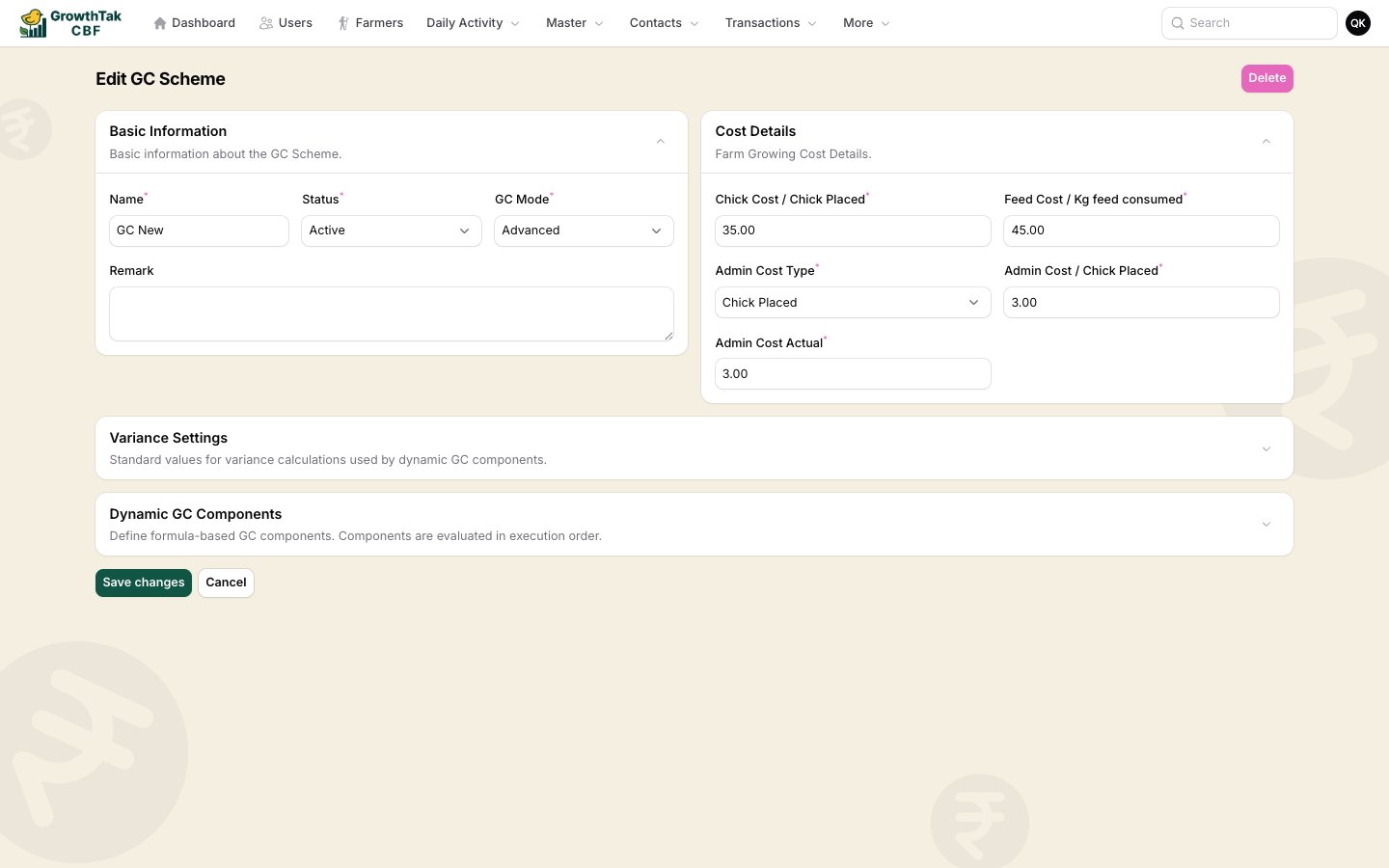
Advanced GC scheme
Variance Settings — the standards that variance variables compare against:
FieldMeaning
Standard FCRBenchmark FCR, used by fcr_variance.
Standard MortalityBenchmark mortality %, used by mortality_variance.
Dynamic GC Components — the payment is built from a list of components, each evaluated in order:
PropertyMeaning
NameA label, e.g. Base Rate, FCR Incentive.
TypeBase Rate, Incentive, Penalty, Adjustment, or Deduction. Penalty and Deduction subtract; the rest add.
Execution stageMain (normal) or Post (runs after the mains — e.g. a tax on the running total).
ActiveToggle a component on/off.
FormulaAn expression that produces the component’s amount (see below).
ConditionAn optional rule — the component only applies when the condition is true.

Formulas

A component’s formula is a math expression written with the variables GrowTak provides for the batch. For example:
sales_rate * total_sold_weight            // base payment on weight sold
fcr_variance * 2 * total_sold_weight      // ₹2/kg for every point FCR beats standard
total_gc_without_tax * 0.01               // 1% deduction (as a Post component)

Conditions

A condition decides whether a component applies. It can be a single rule or a group of rules joined by AND/OR. Each rule compares a variable to a value with an operator (<, <=, ==, >=, >, or between). For example: apply this penalty only when mortality_percentage > 5.

Available variables

These are the values you can use in formulas and conditions. They’re computed from the batch’s actual data at calculation time.
VariableMeaning
total_birds_inChicks placed
total_mortalityBirds died/removed
mortality_percentageMortality as % of placed
livability_percentage100 − mortality %
total_bird_soldBirds sold
remaining_birdsPlaced − mortality − sold
mean_ageAverage age at sale (days)
VariableMeaning
fcrActual feed conversion ratio
avg_bird_weightAverage weight per bird sold (kg)
total_sold_weightTotal kg of birds sold
VariableMeaning
feed_cost_actualActual feed cost
medication_cost_actualActual medicine cost
chick_cost_actualActual chick cost
total_cost_actualSum of actual costs
total_cost_schemeCost using scheme rates
cost_per_kg_actualActual cost ÷ kg sold
cost_per_kg_schemeScheme cost ÷ kg sold
VariableMeaning
fcr_varianceStandard FCR − actual FCR (positive = better)
mortality_varianceStandard mortality % − actual (positive = better)
production_cost_kg_varianceStd production cost − scheme cost per kg
sales_rateAverage sale rate per kg
running_totalGC accumulated so far (updates after each component)
The scheme form shows this same variable list inline as a helper while you write formulas, so you don’t have to memorise the names.

Templates, cloning & reuse

  • Mark a scheme as a template to reuse it as a starting point.
  • Clone any scheme (with its components) to make a variant.
  • Use Create from template to spin up a new scheme from a saved template.
A scheme that’s already attached to a batch cannot be deleted. Set it Inactive or clone it to make changes for future batches.